TRIGGERcmd
    • Categories
    • Recent
    • Tags
    • Popular
    • Users
    • Groups
    • Search
    • Register
    • Login
    1. Home
    2. Instructions
    3. Raspberry Pi
    Log in to post
    Load new posts
    • Recently Replied
    • Recently Created
    • Most Posts
    • Most Votes
    • Most Views
    • RussR

      Raspberry Pi image with TRIGGERcmd pre-loaded

      raspberry pi • • Russ
      1
      0
      Votes
      1
      Posts
      1.1k
      Views

      No one has replied

    • RussR

      Raspberry Pi setup

      raspberry pi • • Russ
      40
      0
      Votes
      40
      Posts
      35.6k
      Views

      Jorge FuentesJ

      That's brilliant, thank you for the information.

    • H

      Error while installing the triggercmdagent

      • • Hannibal
      4
      0
      Votes
      4
      Posts
      75
      Views

      RussR

      @Hannibal said in Error while installing the triggercmdagent:

      Notice: Download is performed unsandboxed as root as file '/home/hannibal/downloads/triggercmdagent_1.0.1_all.deb' couldn't be accessed by user '_apt'. - pkgAcquire::Run (13: Permission denied)

      Copy/paste that into ChatGPT to know why, but you can safely ignore that "Notice". Basically it means the _apt user doesn't have access to your user's home directory where the .deb file is, so it's using root to access it instead.

      It looks like the agent is installed now, so you can move on to the next step:

      node /usr/lib/triggercmdagent/resources/app/src/agent.js --console

      It should prompt you for a token which you can copy/paste from the Instructions page while logged in at https://www.triggercmd.com

    • S

      I want to be able to trigger an Alexa routine from a command line with the triggercmdagent installed on my Raspberry Pi

      • • sparker
      8
      0
      Votes
      8
      Posts
      2.8k
      Views

      XanderX

      I use CMDNOWND for this. https://dennisbabkin.com/cmdnownd/

      You pop it in the cmd line like this: cmdnownd "D:\Libraries\Documents\batchfile.bat" and it suppresses the appearance of the cmd window. Just place the exe in your path. I keep it in the Windows folder itself.
      scrsht_cmdnownd.png

    • M

      How do I create a trigger

      • • mega_big
      2
      0
      Votes
      2
      Posts
      590
      Views

      RussR

      @mega_big, on a Raspberry Pi, assuming you installed the agent using these instructions, your commands are in this file:

      /root/.TRIGGERcmdData/commands.json

      You'll see the default commands in there.

      You can run these commands to edit it:

      sudo su - cd /root/.TRIGGERcmdData nano commands.json

      While the agent is running, it will detect changes in that commands.json file and create/remove triggers for those commands in your TRIGGERcmd account. If you mess up the json at all (an extra comma even), the agent will restore the last backup it took. You'll see that in your debug.log.

      If you don't want to deal with editing text, you could create a command on your Windows PC using the "GUI Command Editor" then copy/paste the json text of that command from the "Text Command Editor" into your commands.json file.

    • J

      Issues following installation instructions

      • • jcksnftsn
      9
      0
      Votes
      9
      Posts
      2.0k
      Views

      RussR

      @jcksnftsn, awesome.

    • Al S.A

      Commands.json reverting to previous version

      • • Al S.
      8
      0
      Votes
      8
      Posts
      1.8k
      Views

      RussR

      @Al-S, do the new commands have a voice word? That's required for the skill to create devices.

    • Al S.A

      New user on latest Raspberry Pi help please!

      • • Al S.
      4
      0
      Votes
      4
      Posts
      955
      Views

      RussR

      @Al-S, great. Glad that was it.

    • Furkan CevikF

      How to exactly run Commands on Raspi via Voice on Alexa

      • • Furkan Cevik
      3
      0
      Votes
      3
      Posts
      1.1k
      Views

      Furkan CevikF

      @Russ ty!!

    • RussR

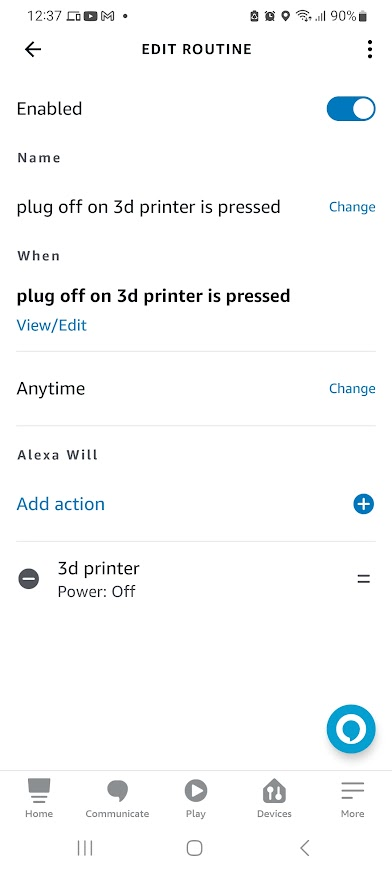
      Turn on 3D printer, print, then turn it off

      • • Russ
      1
      0
      Votes
      1
      Posts
      796
      Views

      No one has replied

    • D

      Contents of command.json getting lost

      • • draddog
      9
      0
      Votes
      9
      Posts
      2.1k
      Views

      D

      Russ, is there any other information that you need or anything else that I can do or provide to help determine what to do to get my commands.json commands into TRIGGER.cmd on my RasPi Zero W?

    • H

      NODE_TLS_REJECT_UNAUTHORIZED

      • • hogkite
      6
      0
      Votes
      6
      Posts
      6.8k
      Views

      RussR

      @hogkite, you're welcome.

      I just updated the Mac agent too.

    • X

      This topic is deleted!

      • • xtole
      1
      0
      Votes
      1
      Posts
      1
      Views

      No one has replied

    • Riccardo CereserR

      Cannot execute shell scripts: Wrong json syntax?

      • • Riccardo Cereser
      4
      0
      Votes
      4
      Posts
      1.2k
      Views

      RussR

      @riccardo-cereser, please try adding this to your script:

      SCRIPTDIR=$(dirname "$0") cd $SCRIPTDIR

      That way you can specify the full path to your script in the commands.json file, and when your script runs, it will cd to the directory where your script is.

    • Pé de PanoP

      i can't add trigger on my raspberry pi

      • • Pé de Pano
      7
      0
      Votes
      7
      Posts
      1.7k
      Views

      Pé de PanoP

      It all worked out! Thank you very much Russ, you helped me a lot.@russ

    • Celso SantosC

      I can't create triggers on the raspberry pi

      • • Celso Santos
      12
      0
      Votes
      12
      Posts
      4.1k
      Views

      RussR

      @dean-mcnaughton, nice. Good job getting it working.

    • ZeD MaSteRZ

      installing triggercmd on a raspberry pi router that has openWRT

      • • ZeD MaSteR
      2
      0
      Votes
      2
      Posts
      833
      Views

      RussR

      @zed-master, if you can install nodejs on it, you should be able to run the agent.js with a command like this:

      node agent.js --console

      You can find the agent code at https://github.com/rvmey/TRIGGERcmdAgent

    • Steve PorterS

      Command format on Raspi

      • • Steve Porter
      32
      0
      Votes
      32
      Posts
      13.5k
      Views

      tuicemenT

      @steve-porter yep that will mess things up. I remember reading another post about that so that isn't something that you alone have experienced. I found a couple times the file didn't update for me for different errors in command lines.
      I've gotten into the habit of double checking if it saves.

    • Andy KutruffA

      Raspbery Pi docker / docker-compose

      • • Andy Kutruff
      2
      0
      Votes
      2
      Posts
      1.2k
      Views

      RussR

      @Andy-Kutruff, try this one. I just pushed it:

      docker pull rvmey/triggercmdagent:arm

      You'll need to create an actual computer record in your account and get the ID for it from your browser's address bar after you click view triggers.

    • Sébastien PineauS

      Installation error on Raspberry PI 3

      • • Sébastien Pineau
      7
      0
      Votes
      7
      Posts
      1.7k
      Views

      RussR

      Very cool. Thanks @Sébastien-Pineau. I'll let you know if I get this working.