• tcmd GO command line tool is available now

    Pinned Moved
    1
    0 Votes
    1 Posts
    5k Views
    No one has replied
  • Trigger for standby (Alexa)

    4
    0 Votes
    4 Posts
    758 Views
    RussR
    @Lokilator nice, I've used the shutdown command in the past. I haven't seen that one.
  • Batch file run by trigger behaves differently than run locally?

    3
    0 Votes
    3 Posts
    601 Views
    Carol ClarkC
    This is one of those old-fashioned Windows batch bugs that only manifests after interactive operations are discontinued. Your.bat is launched in a non-interactive session by TRIGGERcmd. Even if you say "foreground," there isn't a true console connected, so anything that thinks it's a tty may silently misbehave. The reason your script gets beyond taskkill but never reaches the restart is because TIMEOUT is infamous for its ability to either quit instantly or block strangely when there is no interactive terminal. it also explains why there isn't a window: Unless you specifically force a visible cmd.exe session, TRIGGERcmd is not generating one. Avoiding TIMEOUT in this situation is the solution. It spins up its own process with a suitable wait handle, thus wrapping it with start/wait works. For the same reason, ping 127.0.0.1 -n X works; console state is irrelevant. If you really want to view output, using cmd /c or cmd /k manually is a good alternative. Additionally, ensure that the program.exe is launched using the whole path rather than just the working directory. Since C:\Windows\System32 is often used as cwd when triggers execute, relative paths will fail silently. In summary, it's not a TRIGGERcmd problem or a permissions issue. Batch + non-interactive Windows execution is used. It will act the same as if you ran it locally if you change the TIMEOUT and use complete paths.
  • Java error when installing triggercmd

    2
    2
    0 Votes
    2 Posts
    593 Views
    RussR
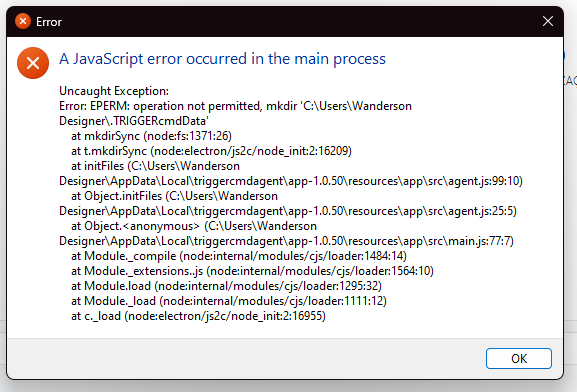
    @wandersonjvs, thanks for the screenshots. I suspect you have some antivirus software that's preventing the agent from creating the .TRIGGERcmdData folder under your user's home folder. You could try creating it manually, or you could try temporarily disabling your antivirus software.
  • Triggercmd failing to install the background agent

    2
    1
    0 Votes
    2 Posts
    767 Views
    RussR
    @Moacir-Vilela-Sêga, I just uninstalled and re-installed the background agent. I'm using the latest version of the agent - 1.0.47. You could try rebooting, then trying again. [image: 1753911522486-e788eeca-f14c-4f96-86c4-1bd92bdd792c-image.png]
  • TriggerCMD não carrega a tela de comandos

    2
    0 Votes
    2 Posts
    836 Views
    RussR
    @Jordel-Miranda, I think you have something in your commands.json that's causing the issue. Please try renaming it. It's in this folder: C:\Users\(your user)\.TRIGGERcmdData
  • Issue with TriggerCMD Commands Not Updating on Website

    9
    0 Votes
    9 Posts
    3k Views
    RussR
    @Tony-Seaback, I see from your other posts you're using the background service. I assume the foreground service is sync'ing foreground commands just fine? I just found out the background service is broken on Windows version 1.0.45. I'm working on the fix now. EDIT: Please upgrade to version 1.0.46. It should fix the windows background service. Sorry about the bug.
  • 0 Votes
    2 Posts
    878 Views
    RussR
    @Mark-Hollis, your commands are not stored in the cloud. They're only stored on your computer, so if you don't have a backup of your commands.json file, you'll need to recreate them. One Windows you can find your commands.json file in this folder: c:\Users\(your user)\.TRIGGERcmdData If you're not subscribed, you'll need to delete your current computer before you can create another one.
  • Computer is dead. How to recover triggers from website?

    3
    0 Votes
    3 Posts
    1k Views
    Nelson BrN
    @Russ oh man, what bad news are these...! ok, let's do it from scratch again then... and I now will save a copy of my .json file in my dropbox... thanks for the prompt answer!
  • This topic is deleted!

    1
    0 Votes
    1 Posts
    8 Views
    No one has replied
  • 0 Votes
    2 Posts
    729 Views
    RussR
    @Mariana-Castro, if you didn't save your c:\Users\(your user)\.TRIGGERcmdData\commands.json from your previous Windows load, you've lost your commands.. You should delete your computer from your TRIGGERcmd account so you can recreate it from your new Windows load. For security reasons, TRIGGERcmd does not store the actual commands in the cloud - they only exist on your computer in your commands.json file.
  • Opening the utility using CMD

    2
    0 Votes
    2 Posts
    953 Views
    RussR
    @Mauro, there's no built-in way to open the GUI Editor using a command, but if you want I could build it into the next version of the agent. I remember you did it this way, so I assume you're looking for a simpler/cleaner method. https://www.triggercmd.com/forum/topic/2716/macro-to-open-triggercmd-gui?_=1718324644863
  • reset my pc

    2
    0 Votes
    2 Posts
    901 Views
    RussR
    @Emanuel-Esteves, in your user profile folder, there's a subfolder called .TRIGGERcmdData, for example: C:\Users\russe\.TRIGGERcmdData In that folder there's a commands.json and a computerid.cfg file. If you put the ID of the old computer in the computerid.cfg file, it will login as that computer. The commands.json file contains your commands, so if you still have a copy of that, you'll be able to restore your commands. Otherwise, you'll need to rebuild your commands. When your computer logs in, it synchronizes the commands in commands.json with the computer record in your TRIGGERcmd account. To find the ID of your old computer, you can click View Triggers for that computer, then you'll see the computer ID in the browser URL: [image: 1713357562360-44363ede-f14b-41a3-891c-131f4deefc66-image.png] I hope this helps. Sorry if this means you lost your commands and you need to rebuild them. At least you have a list of them in your account in the old computer record.

  • Triggercmd doesn't install windows 64 bits

    3
    2
    0 Votes
    3 Posts
    1k Views
    RussR
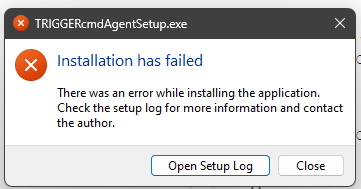
    @Igor-Marinho, Alexa talks to the TRIGGERcmd servers, and the TRIGGERcmd servers talk to the agents. Next time, please test the agent first by running your commands from the triggercmd.com website. If that works, there's no need to troubleshoot the agent and you can move on to troubleshooting the Alexa integration. Also if you do have an agent problem, instead of uninstalling/re-installing it, you should try restarting it. We can troubleshoot Alexa after you re-install the TRIGGERcmd agent and test it from the triggercmd.com website. Please try deleting your C:\Users\(your user)\AppData\Local\triggercmdagent directory, then re-install the TRIGGERcmd agent. Hopefully that will work around the installation error.
  • Change computer

    5
    0 Votes
    5 Posts
    1k Views
    S
    @Russ so the short URLs act as a redirect. Thanks Russ.
  • Turn On Notebook Display

    2
    0 Votes
    2 Posts
    908 Views
    XanderX
    @Bruno-Rafael Look through recent posts for NirCmd instructions. It can simulate key presses but I don't know that a virtual press will suffice. If it does, simply create an Alexa routine with both actions (and you'd probably want to throw a Wait command in between)
  • Windows Agent not assigned to my PC

    1
    0 Votes
    1 Posts
    604 Views
    No one has replied
  • This topic is deleted!

    1
    0 Votes
    1 Posts
    3 Views
    No one has replied
  • Update Agent Triggered Antivirus (Bitdefender)

    4
    0 Votes
    4 Posts
    1k Views
    RussR
    @StealthNet, yes, good idea. To avoid that problem when you update next time you could exclude those two folders.
  • Use "Voice Reply" accordingly to make it work

    3
    1
    0 Votes
    3 Posts
    1k Views
    Furkan CevikF
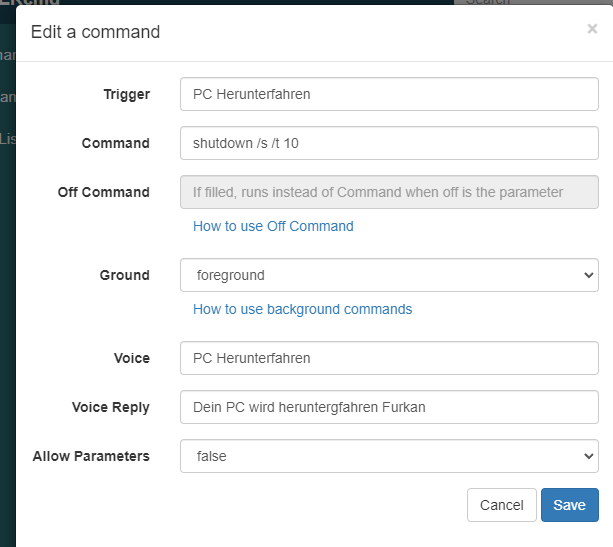
    @Russ Yea i use the Smart Home Skill, like it much more Ill stick with the Routine way, it aint that bad Thanks again!