OAuth support for MCP server
-
Any plans on supporting OAuth for the MCP server? The reason I ask is that ChatGPT requires OAuth if you use an MCP server as an "app".
Thanks. Also your app is awesome!
Kevin
-
Thanks @Kevin-0. Now that you asked, I'll definitely look into it.
-
EDIT: The TRIGGERcmd ChatGPT app is now live - you'll find it in the official directory here.
Original post follows:
@Kevin-0, it should work now, but only if you have a paid ChatGPT "plus" subscription or greater.
To add the TRIGGERcmd MCP server (https://www.triggercmd.com/mcp) to your ChatGPT account:
-
Enable development mode here: https://chatgpt.com/#settings/Connectors/Advanced
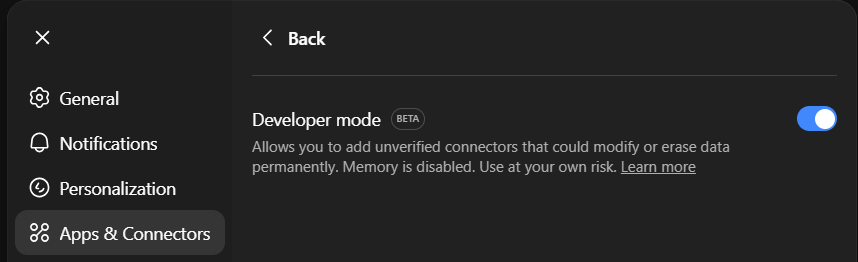
-
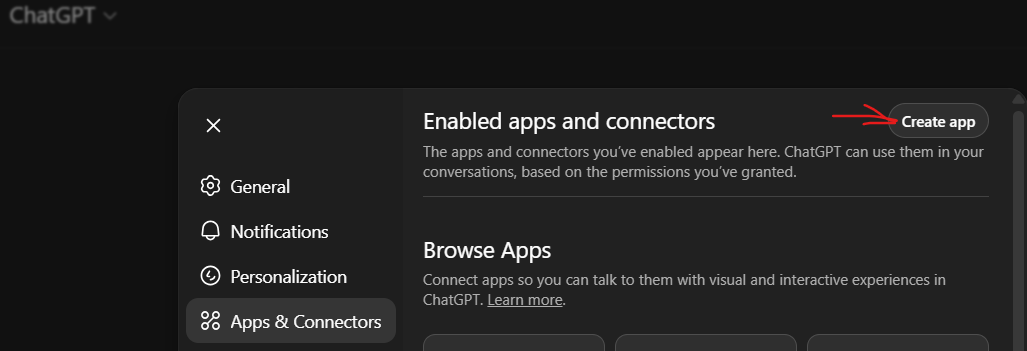
Click "Create app" and set it up like this:

I paid for the ChatGPT plus upgrade and tested it:

EDIT: I submitted the MCP server to OpenAI to be included in their app store. That should solve the issue I've seen where ChatGPT runs the command twice. If they reject the app I'll do something to debounce it.
-
-
 R Russ referenced this topic on
-
@Russ Awesome! Thank you so much. Hopefully OpenAI will support your submitted app!

Hello! It looks like you're interested in this conversation, but you don't have an account yet.
Getting fed up of having to scroll through the same posts each visit? When you register for an account, you'll always come back to exactly where you were before, and choose to be notified of new replies (either via email, or push notification). You'll also be able to save bookmarks and upvote posts to show your appreciation to other community members.
With your input, this post could be even better 💗
Register Login