TRIGGERcmd
    • Categories
    • Recent
    • Tags
    • Popular
    • Users
    • Groups
    • Search
    • Register
    • Login
    1. Home
    2. Alexander Cleary
    3. Topics
    Alexander ClearyA Offline
    • Profile
    • Following 0
    • Followers 0
    • Topics 4
    • Posts 9
    • Groups 0

    Topics

    • Alexander ClearyA

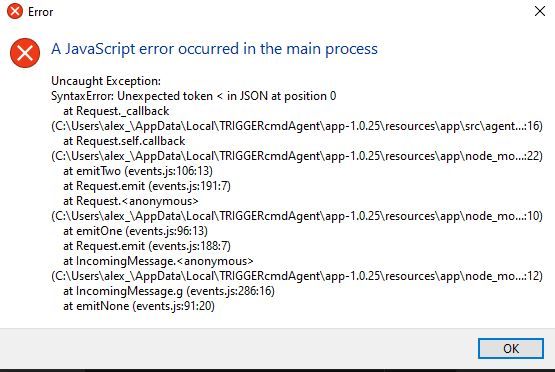
      I keep getting this error on cpu startup

      Watching Ignoring Scheduled Pinned Locked Moved General Discussion
      3
      1
      0 Votes
      3 Posts
      755 Views
      Alexander ClearyA
      okay thanks Russ, I was on vacation, maybe it was something to do with the wifi for the hotel, i'll let you know if it continues doing it now i'm back
    • Alexander ClearyA

      Command Doesn't Work If PC Hasn't Been Used Recently (Not In Sleep)

      Watching Ignoring Scheduled Pinned Locked Moved General Discussion
      4
      0 Votes
      4 Posts
      2k Views
      RussR
      @alexander-cleary, I'm trying to reproduce the problem myself. I setup my Windows laptop the same way - to not go to sleep when I close the lid (while plugged in to AC power). Hopefully I can reproduce the problem you see. I'll know in about an hour. So far I know it's working because I see the "Command ran" entries in the runs list. Also if you haven't already done it, could you see whether leaving the lid open makes a difference? EDIT: I waited more than an hour and the TRIGGERcmd agent on my laptop is still responding. [image: 1653234937517-f7c92b55-e3a6-4787-9219-9e280cb52f4a-image.png] My laptop is Windows 10. Is yours Windows 11 by chance?
    • Alexander ClearyA

      Can't connect my account, don't get a token prompt after install

      Watching Ignoring Scheduled Pinned Locked Moved General Discussion
      6
      0 Votes
      6 Posts
      2k Views
      RussR
      @alexander-cleary, you trigger a .bat command by putting the full path to that .bat file in the command field. Like this: [image: 1637425901028-bdadcb88-f150-4501-9295-5198341884a3-image.png] Also, to open a particular spreadsheet, you don't need a .bat file. You can create a command like this: [image: 1637426068560-1d23a58b-e983-45da-a829-157f5f9aef82-image.png]