Installation on Second Mac
-
@abaratz, if you run the TRIGGERcmdAgent app from your Applications folder, does it show up in your menu bar at the top?
I'm running Sonoma and it's working for me - it also auto-starts when I login.
There's one thing I don't understand about what you wrote. You cannot use one computer to create a command on a different computer, unless maybe you're using some sort of remote control, or editing the commands.json file across the network. You can only create commands using the computer the commands will run on.
Are you able to click the green Trigger button on the triggercmd.com website and see your command run on your second Mac? You should make sure that works before attempting to run it via Alexa or Google Assistant.
-
@Russ Yes - I am running out of the applications folder. TC is showing up in the bottom running taskbar and at the top left as the application with focus. But, it is not in the menu bar. By the way, on my primary Mac, it shows up in the menu bar, but not in the task bar. As for running a command on the second Mac, I thought that if I created a command on the first Mac that had a voice command that included "on [voice name of second computer]" then it would run on the second computer. It sounds like I was wrong about that. Since I don't have TC in the menu bar, I don't know how to invoke the command editor on the second computer. Is there a way to directly invoke it? Thanks.
-
@abaratz, no, there's no way that I know of to manually invoke the GUI Editor except via the Tray icon. I'm upgrading my mac to Sonoma 4.4.1 right now. If I can reproduce it I should be able to solve it. In the meantime, you could edit your commands.json file manually to add commands. It's a text json file at this path:
~/.TRIGGERcmdData/commands.json~ is your home folder.
If you haven't tried closing and re-opening the TRIGGERcmdAgent, please try that.
-
@Russ Thanks.
Yes, I have tried quitting and restarting the agent.
I’ll try editing the json for now.
-
@abaratz , I don't see the same problem on my mac. Which Mac CPU are you running? I'm running an Intel.
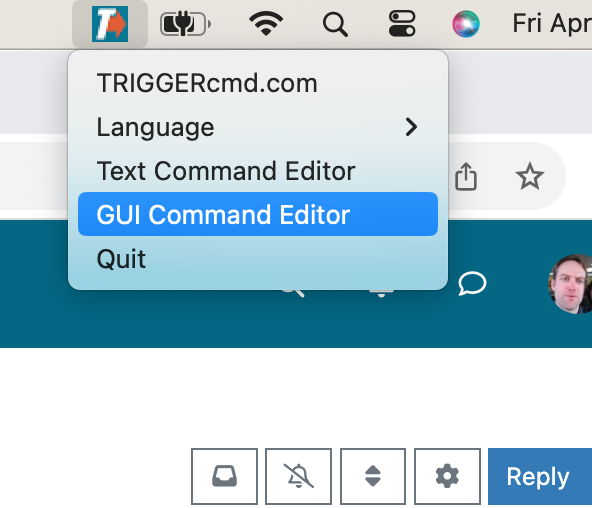
FYI, I also deleted my agent and re-installed it after upgrading to 4.4.1 and it's still working for me.
-
@Russ I’m using a new MacAir with an M3 processor - Apple silicon.
-
@Russ Also, the OS is 10.4.1, not 4.4.1.
-
@Russ Oops - That’s 14.4.1 on the OS. Sorry.
-
@abaratz, ok, we have the same OS. I meant 14.4.1 when I wrote 4.4.1 above. I hope it's not a CPU issue but I'll do some research and testing with Apple silicon. I'm pretty sure it has worked on Apple silicon though, so I doubt that's it.
If you haven't tried uninstalling / re-installing, that's something you could try. Also, what antivirus software do you have, if any.
Thank you for your help and patience BTW.
EDIT: I just tried it on a Mac with an M1 Applic silicon chip and it worked for me.
-
@Russ Yes - I have tried uninstalling and re-installing, but the result was the same. Also, I just shutdown the Mac and restarted it. I watched the menu bar closely during the startup and TC showed up in the menu bar for about two seconds and then went away. Odd. In any case, thanks for trying.
Alan.
-
@Russ And, no antivirus software other than what comes with the OS. Thanks.
-
@Russ By the way, editing the commands.json file worked. Thanks for suggesting that.
-
@abaratz, you're welcome. I'm glad that worked as a work-around. Thank you for reporting the problem too.
If anyone else experiences this problem, please tell me.
-
 R Russ referenced this topic on
Hello! It looks like you're interested in this conversation, but you don't have an account yet.
Getting fed up of having to scroll through the same posts each visit? When you register for an account, you'll always come back to exactly where you were before, and choose to be notified of new replies (either via email, or push notification). You'll also be able to save bookmarks and upvote posts to show your appreciation to other community members.
With your input, this post could be even better 💗
Register Login