Option for it to work only with the "task'', is it possible?
-
Is it possible to somehow keep TRIGGERcmd TOTALLY hidden? As for example, it remains active but hidden and only appear something related when you open the application itself through the Start menu or desktop shortcut. We know he stays hidden... But not totally, such as his icon that keeps appearing on the taskbar, which bothers a little, is there a solution to this?
-
 X Xander moved this topic from Announcements on
-
@kanashi横維 [Moved to General Discussion as this is not an Announcement]
-
@kanashi横維, are you hoping there's a way to hide this TRIGGERcmd tray icon?

Sorry, there's no way to hide it.
EDIT:
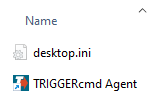
Actually, you could install the background service, then prevent the TRIGGERcmd Agent shortcut from executing when you login. If you do that, you'll need to manually run it to get to the GUI Editor for commands.json.To prevent the TRIGGERcmd Agent shortcut from running (the "foreground" agent), you would remove it from your Startup folder.
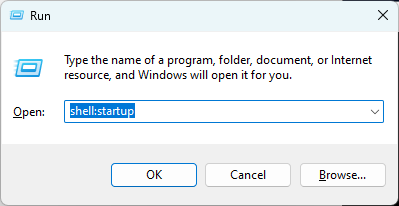
Press Windows-R and paste in shell:startup and click OK.
Then delete the shortcut or move it out of the Startup folder.


Hello! It looks like you're interested in this conversation, but you don't have an account yet.
Getting fed up of having to scroll through the same posts each visit? When you register for an account, you'll always come back to exactly where you were before, and choose to be notified of new replies (either via email, or push notification). You'll also be able to save bookmarks and upvote posts to show your appreciation to other community members.
With your input, this post could be even better 💗
Register Login