Como usar o Nircmd?
-
Sempre que dou comando no trigger ele abre o prompt.
Como fazer? -
@Ricardo-Pereira, first, download the nircmd.exe file from here:
https://www.nirsoft.net/utils/nircmd.htmlCopy the nircmd.exe file to c:\windows or some other folder that your PATH environment variable points to. That way you can make your commands like this:
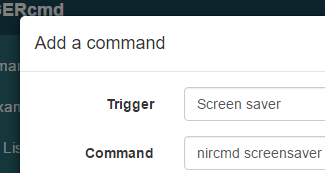
nircmd screensaver
Or, if you put nircmd.exe in a folder like c:\tools, then make your commands like this:
c:\tools\nircmd screensaver
There are a lot of examples at that URL above, and the NirCmd.chm help file that nircmd comes with has even more.
-
@Russ said in Como usar o Nircmd?:
@Ricardo-Pereira, first, download the nircmd.exe file from here:
https://www.nirsoft.net/utils/nircmd.htmlCopy the nircmd.exe file to c:\windows or some other folder that your PATH environment variable points to. That way you can make your commands like this:
nircmd screensaver
Or, if you put nircmd.exe in a folder like c:\tools, then make your commands like this:
c:\tools\nircmd screensaver
There are a lot of examples at that URL above, and the NirCmd.chm help file that nircmd comes with has even more.
e em outros horários jogue em https://sweet-bonanza.com.br/1win-cassino
Thank you
-
@Russ Don't forget that if you run Nircmd without any parameters at all, it provides a button to copy it to c:\windows. It must be run with Admin privileges (Run box ... ctrl+shift+enter) though.
-
@Xander, good point.




Hello! It looks like you're interested in this conversation, but you don't have an account yet.
Getting fed up of having to scroll through the same posts each visit? When you register for an account, you'll always come back to exactly where you were before, and choose to be notified of new replies (either via email, or push notification). You'll also be able to save bookmarks and upvote posts to show your appreciation to other community members.
With your input, this post could be even better 💗
Register Login