Set Windows volume to X
-
Hi, i used the high volume command that has in the examples with the smarthome alexa skill, but i'd like to say a specific volume, something like "Alexa, set the volume of computer to X".
I read the sending params topic, but i dont want to have to say "ask triggercmd to set te volume with the parameter 80".
Is there a way? Thanks a lot.
-
Create a command using Nirsoft.net's NIRCMD. (Instructions on its page or search these forums). It supports a ton of little commands like that.
-
This post is deleted! -
@Xander The problem isn't about how to do the command to change the volume, but if there's a way to pass the parameter someway so I don't have to say "Alexa, ask TriggerCMD to set computer's volume with parameter 80" but just "Alexa, set computer's volume to 80"
I setted up the command with the NirCMD, and using the command line in windows i can change the volume with the %1 and putting the param after the command, but i tried with alexa, saying "Alexa, turn computer's volume with parameter 80" and she reply something like "Computer's volume isn't compatible with this"
PS: computer's volume is the voice option in the triggercmd command
PS2: i'm using alexa in pt-br, maybe the params with alexa in portuguese isnt avaible? -
@Russ is the author and knows how parameters work.
As a backup plan, you could set up multiple Triggercmd/nircmd commands for Vol 20, Vol 40, etc.
-
@Xander ok, so, after doing some more research and trying other things, this was what I was doing wrong:
I discovered that the SmartHome skill isn't capable of parsing params like numbers, only on and off. So I have to use the Execute Command skill, right?
And probably, when parsing numbers to Alexa, she sends it written (maybe?!) to the triggercmd, so I added in my batch script, some lines to transform the written numbers into numerical ones.
And now it's working, but it is still a lot of work having to say "Alexa, ask Execute Command to open computer's volume with parameter X" or in pt-br that is my native language "Alexa, abra execute comando e execute volume do computador com parâmetro X"
Is there a plan to implement others params in SmartHome skill? Or is there a way to use IFTTT to make this sentece shorter?
Thanks.
-
@Diogo-Menegon, I'm glad you figured that out.
The non-Smart Home skills like "Execute Command", "TRIGGERcmd", and "TRIGGER command" skills allow other parameters besides on and off, but there are two problems with them:
- The sentence structure, "Alexa, abra execute comando e execute volume do computador com parâmetro X" is alot to say.
- Alexa doesn't recognize your words as well as it does when you use the Smart Home skills.
So I think @Xander's suggestion to make commands for volume 20, 40 etc, and use the Smart Home skill makes sense.
-
-
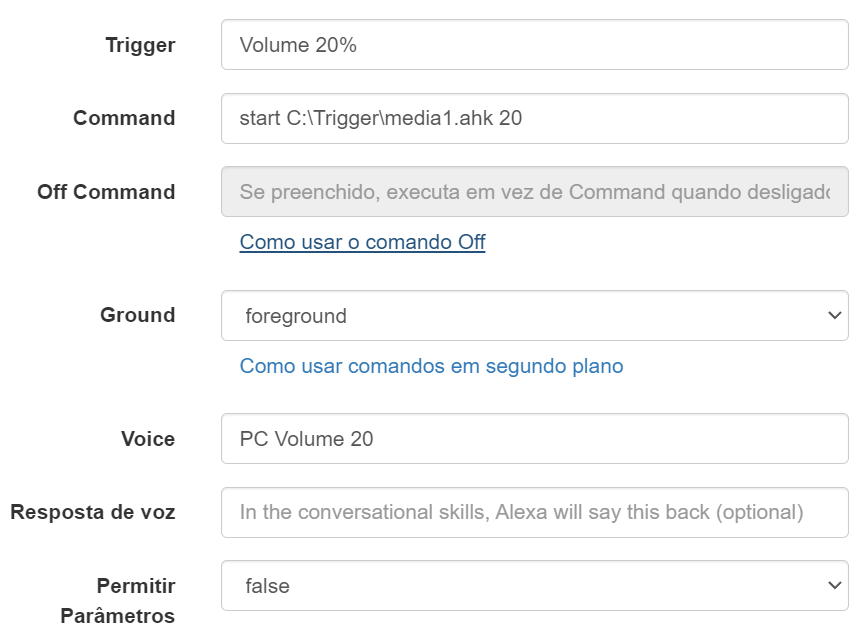
Olá a todos, Eu sou novo e estava tentando definir o volume do computador para um valor específico, como 30%, 40%, 50%......
Não sou da área e foi difícil para mim entender como usar o NIRCMD do Nirsoft.net. Resolvi explorar as opções de uma forma lógica (para mim) e que fosse simples, mesmo que isso gere vários comandos., Eu consegui fazer com sucesso. Criei linhas de comando novas, baixando o volume a zero e aumentando ao número desejado, com base no script do Russ . (A propósito, que trabalho incrível amigo)
(Hello everyone, I am new and I was trying to set the computer volume to a specific value like 30%, 40%, 50%......
I'm not from the area and it was difficult for me to understand how to use NIRCMD from Nirsoft.net. I decided to explore the options in a logical way (for me) and in a simple way, even if it generates several commands., I managed to do it successfully. I created new command lines, lowering the volume to zero and increasing it to the desired number, based on Russ's script. (By the way, what an amazing job my friend))-Script do media.ahk:
........voldown:
Send {Volume_Down 50}
returnmute:
Send {Volume_Mute}
return20:
Send {Volume_Down 50}
Send {Volume_Up 10}
return30:
Send {Volume_Down 50}
Send {Volume_Up 15}
return40:
Send {Volume_Down 50}
Send {Volume_Up 20}
return50:
Send {Volume_Down 50}
Send {Volume_Up 25}
return60:
Send {Volume_Down 50}
Send {Volume_Up 30}
return70:
Send {Volume_Down 50}
Send {Volume_Up 35}
return80:
Send {Volume_Down 50}
Send {Volume_Up 40}
return90:
Send {Volume_Down 50}
Send {Volume_Up 45}
return100:
Send {Volume_Up 50}
return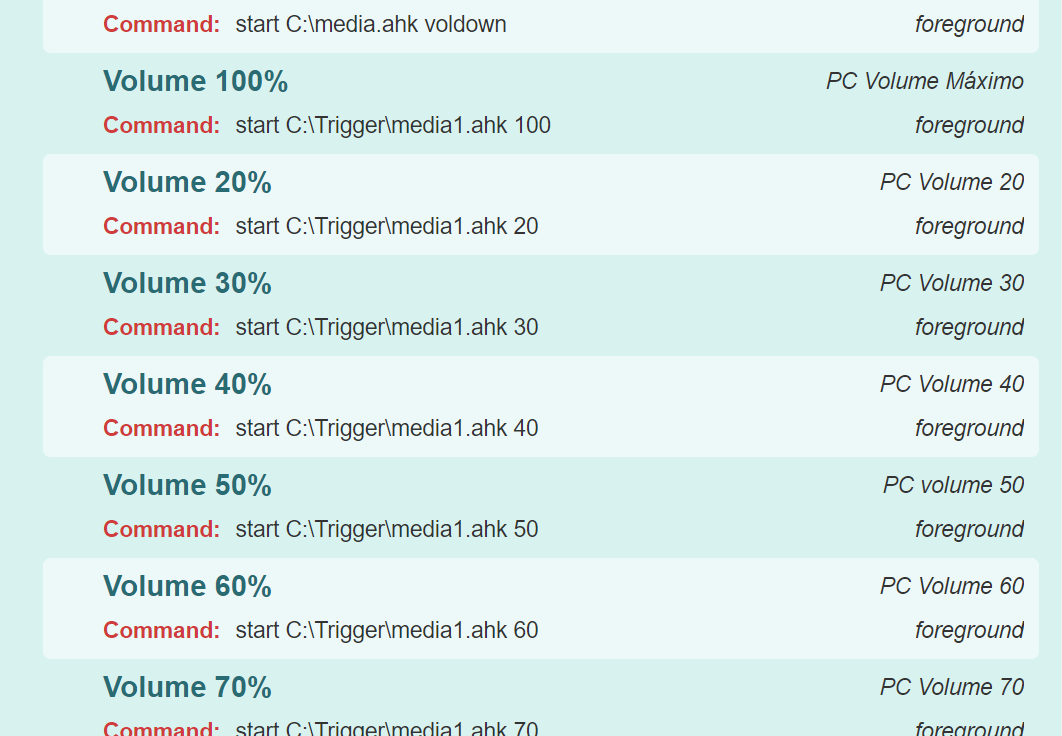
Fiquem em paz




Hello! It looks like you're interested in this conversation, but you don't have an account yet.
Getting fed up of having to scroll through the same posts each visit? When you register for an account, you'll always come back to exactly where you were before, and choose to be notified of new replies (either via email, or push notification). You'll also be able to save bookmarks and upvote posts to show your appreciation to other community members.
With your input, this post could be even better 💗
Register Login