• 0 Votes
    1 Posts
    1k Views
    No one has replied
  • Volume script

    Pinned
    5
    1
    0 Votes
    5 Posts
    3k Views
    RussR
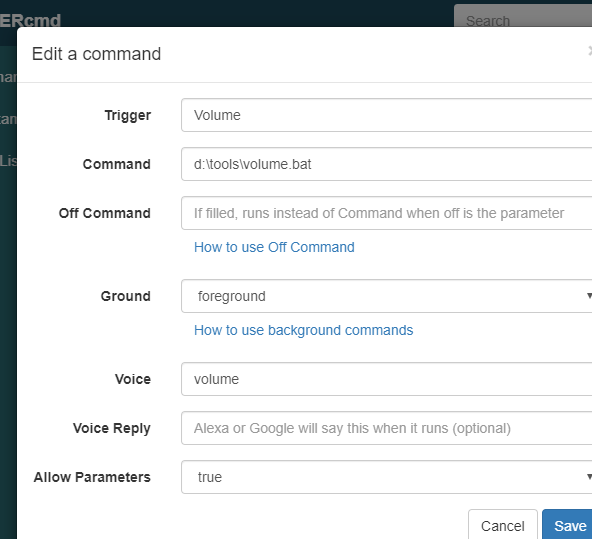
    @Meximistas, I think Alexa would accept one of these: establecer volumen 90 subir el volumen a 90 You'd make the Voice field volumen instead of volume.
  • Say my IP

    Pinned Moved result
    1
    2
    0 Votes
    1 Posts
    1k Views
    No one has replied
  • é possivel desligar o Computador e Monitor com um comando?

    2
    0 Votes
    2 Posts
    504 Views
    RussR
    @Alisson-Teixeira, I translated that as: "I would like to know if it's possible to turn off the monitor and the computer at the same time with just one command? In the free version? With the example command, the monitor enters power saving mode, but doesn't turn off completely... Question for Windows please" You can run multiple commands in one command by putting && between commands, like this: nircmd.exe monitor off && shutdown /s /t 10
  • TRIGGERcmd Misson Control app

    1
    1
    0 Votes
    1 Posts
    222 Views
    No one has replied
  • Turn PC on/off

    4
    0 Votes
    4 Posts
    1k Views
    RussR
    @Rodney-Mathee, I'm glad you told me it's wifi, not wired ethernet. That changes things. For one, that WakeMeOnLan.exe tool from Nirsoft won't work because it doesn't support wireless networks. I've never tried "wake-on-wlan" but in theory it's possible with the right hardware. https://documentation.ubuntu.com/core/explanation/system-snaps/network-manager/how-to-guides/configure-the-snap/wake-on-wlan/
  • Abort shutdown

    5
    0 Votes
    5 Posts
    1k Views
    H
    @Jhon-Piñeres The answer is probably found elsewhere since you asked your question, but because this was the first thread i found i think i post my solution here: Command for shutting down: shutdown /s /t 120 I choose 2 Minutes because thats the a longer time i need to leave but so normaly enough time to stop if i forgot something. Off Command: shutdown /a Now i can tell my alexa to shut down my pc, by switching on shutdown, but i have also 2 minutes to cancel the shutdown by telling alexa to turn off shutdown.
  • Python script to change my wifi color LED light bulb state

    1
    0 Votes
    1 Posts
    549 Views
    No one has replied
  • Start and stop crypto mining with NiceHash

    4
    1
    0 Votes
    4 Posts
    1k Views
    RussR
    Thanks @Xander .
  • 0 Votes
    1 Posts
    795 Views
    No one has replied
  • Upgrade all of your software.

    1
    0 Votes
    1 Posts
    882 Views
    No one has replied
  • How to UNLOCK the Windows screen?

    4
    0 Votes
    4 Posts
    3k Views
    C
    @Russ There has to be a way. Many systems, like VNC for example, use this feature.
  • Add two commands in a single trigger

    2
    0 Votes
    2 Posts
    869 Views
    RussR
    @Carlos-Junior, you could create a script with two commands in it like this: taskkill /f /fi "USERNAME eq %USERNAME%" /fi "WINDOWTITLE ne" shutdown /s /f /t 0 Then your command would run that script with a command like this: c:\scripts\close_all_shutdown.bat If you don't want to create a script, you can generally run multiple commands with one command line by separating the commands with && like this: taskkill /f /fi "USERNAME eq %USERNAME%" /fi "WINDOWTITLE ne" && shutdown /s /f /t 0
  • The sleep comand doesnr suspend the pc its hibernating

    6
    0 Votes
    6 Posts
    2k Views
    RussR
    @Diego-Ulises-Pérez-Ruiz, maybe you need to specify the full path to nircmd.exe in your command, like c:\tools\nircmd.exe ... Also, by manually, I assume you mean when you run it manually from the command line it works. What if you run it manually via TRIGGERcmd using the green Trigger button on the website, or from the green Play arrow in the GUI Editor ? We should make sure those work before attempting Alexa.
  • Turn Off only second Monitor

    1
    0 Votes
    1 Posts
    942 Views
    No one has replied
  • Command to Windows Hibernating

    2
    0 Votes
    2 Posts
    851 Views
    E
    @Oliver-R Thanks a lot
  • How to change to 1 screen to 2 screens

    3
    1 Votes
    3 Posts
    2k Views
    Lucas RosasL
    @Floor_kicker Thank you very much for helping.
  • Reinstallation problem

    6
    1
    0 Votes
    6 Posts
    2k Views
    RussR
    @Giuseppe-Sbirziola , I got your direct message. I'm glad that worked.
  • Alexa ask to say turn on and after command

    2
    0 Votes
    2 Posts
    775 Views
    RussR
    @Rafael-Estevam, what you say to Alexa will make more sense if you make the Voice field just computer instead of turn off computer. The formula is, "Alexa, turn on/off [voice word]." That's assuming you're using the TRIGGERcmd Smart Home skill. In this example, I can say "Alexa, turn on calculator." to open it. "Alexa, turn off calculator." to close it. [image: 1737035827026-7d94e408-a352-4c03-b195-3c512a638539-image.png]

  • 0 Votes
    8 Posts
    2k Views
    S
    @Russ bet man thank you so much for all of your help im new to this coding stuff its super weird to me, Im definitely gonna learn alot from being in this community lol