-
Hi! Quick question on how to launch an application from TriggerCMD on my computer. My current code for this is
"trigger": "League of Legends",
"command": "C:\Riot Games\League of Legends\LeagueClient.exe",
"ground": "foreground",
"voice": "League of Legends",
"voiceReply": "Launching League of Legends" -
@Minh-Tam-Nguyen, that entry looks good, except it needs double backslashes \\, which is something you don't have to worry about if you use the GUI editor.
I recommend finding the icon for the app, and copy/pasting the command from the Target field in it's properties.
-
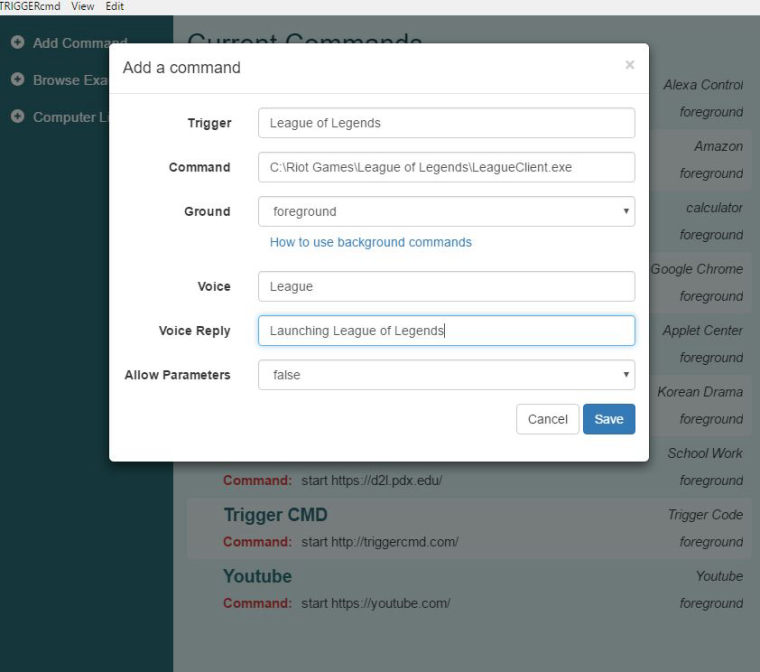
I copied and pasted the command from the Target field in its properties, however, the program still does not launch. Is there something wrong with the way I did it in the GUI editor? Thanks for getting back quickly! I am still fairly new to this. -
@minh-tam-nguyen, I think I might know what's wrong. Because there are spaces in your command, you probably need quotes around it.
Using the GUI editor, please make your command:
"C:\Riot Games\League of Legends\LeagueClient.exe"Also, please test it using the green play button in the GUI editor.
-
Thank you so much! I've been at this for a while now
-
 T tuicemen moved this topic from Instructions on

Hello! It looks like you're interested in this conversation, but you don't have an account yet.
Getting fed up of having to scroll through the same posts each visit? When you register for an account, you'll always come back to exactly where you were before, and choose to be notified of new replies (either via email, or push notification). You'll also be able to save bookmarks and upvote posts to show your appreciation to other community members.
With your input, this post could be even better 💗
Register Login