Claude TRIGGERcmd dashboard artifact
-
Use this prompt in claude code to produce a dashboard artifact like this:
Create a claude.ai Artifact that's a control-panel dashboard for my TRIGGERcmd connector — it lists all my TRIGGERcmd commands, grouped by computer, and lets me run any of them with an optional parameter, right from the page.

Before writing any code:
1. Load the artifact-capabilities skill and read the mcp.d.ts type definitions for the current runtime contract — follow that contract exactly, don't rely on remembered API shape.
2. Find my TRIGGERcmd MCP tools (they'll appear as mcp__<connector>__list_commands and mcp__<connector>__run_command or similar). Actually call list_commands, and actually call run_command once (e.g. trigger a harmless command like a Calculator command) to observe the REAL response shape — TRIGGERcmd tools return plain text, not JSON, so you'll need to parse that text yourself rather than assume structured JSON.
3. Note: the manifest `capabilities` you pass to the Artifact tool uses the connector name segment from the tool's internal name (e.g. "claude_ai_TRIGGERcmd"), which gets auto-resolved to the display name at publish time. BUT the actual `window.claude.mcp.callTool()` / `watchTool()` calls inside the page's JavaScript must use the connector's real DISPLAY NAME (e.g. "TRIGGERcmd"), not that internal segment — using the segment at runtime causes a `not_in_manifest` error even though the manifest itself is correct. Get this right the first time.

Dashboard requirements:
- Use watchTool for list_commands (it's a read, should stay live/refreshable) and callTool for run_command (it's an action, fire on click).
- Parse the text response into computer → [commands] groups; each command may have a voice-trigger label and/or a description (commands with descriptions typically accept a text parameter).
- Layout: sidebar or nav of computers with command counts, a search box that filters across all commands, collapsible groups per computer, and a Run button + optional parameter input per command.
- Show a live activity log (e.g. fixed panel) of triggered commands with pending/success/error status, since these are fire-and-forget hardware/device triggers with no persistent state to poll.
- Handle MCP failure states distinctly per the type definitions — don't collapse everything into one generic error banner: distinguish "connector not connected/needs reauth" (show a reconnect message) from "temporarily unavailable" (offer retry, keep last-good data visible) from "not available in this context" (full-page fallback, e.g. when window.claude.mcp is undefined).
- Design it as a real control-panel UI (dark/light theme aware, decent typography, not a default Bootstrap-y look) — apply the artifact-design skill's guidance for a UI/dashboard treatment.

Publish it as a shareable Artifact with an appropriate favicon.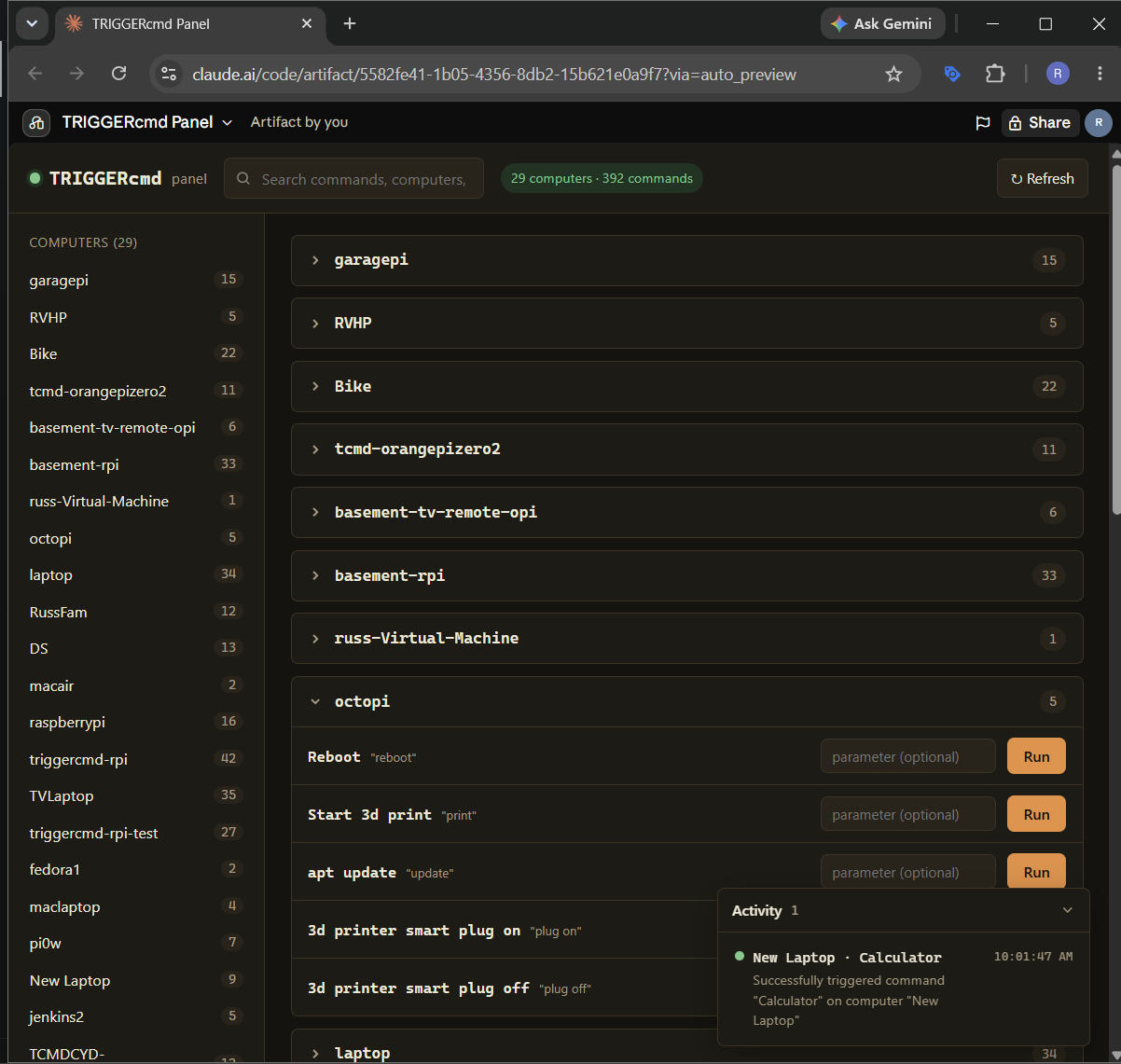
Then you'll find this and other artifacts here: https://claude.ai/artifacts

Hello! It looks like you're interested in this conversation, but you don't have an account yet.
Getting fed up of having to scroll through the same posts each visit? When you register for an account, you'll always come back to exactly where you were before, and choose to be notified of new replies (either via email, or push notification). You'll also be able to save bookmarks and upvote posts to show your appreciation to other community members.
With your input, this post could be even better 💗
Register Login