-
I'm trying to open Call Of Duty Warzone, but before it opens, Launcher Battle.net will open first. For the game to start I need to click on "Play" in the Launcher. Is there any way around this situation?
-
@Arnold-Martinez-Castillo, I don't have Call Of Duty Warzone, but I did figure it out for World of Warcraft, so I think you could the same method to find the .exe file, and run it directly.
I opened Task Manager's Details tab and sorted by the CPU column, then I opened World of Warcraft from the Battle.net app. The top CPU user was Wow.exe.
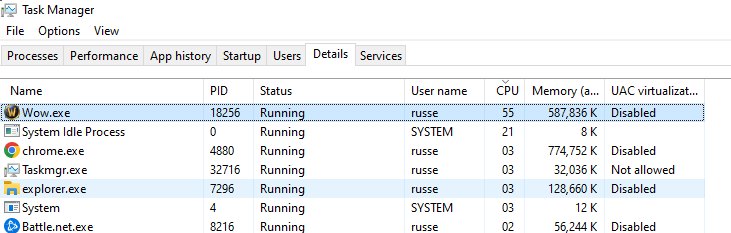
I right-clicked Wow.exe and clicked Open file location.
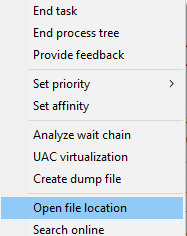
That showed me the full path to Wow.exe.
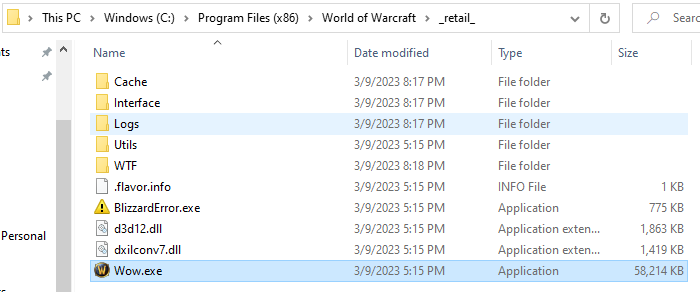
Now I can launch it with this command:
"C:\Program Files (x86)\World of Warcraft\_retail_\Wow.exe"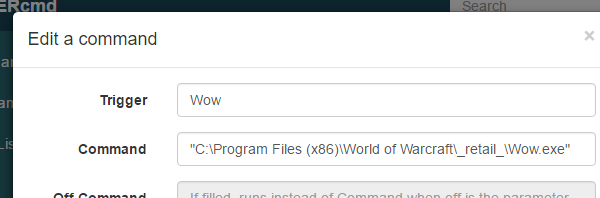
-
@Russ not work for cod, just try to run it, but dont do it
"C:\Program Files (x86)\Call of Duty_retail_\cod.exe"
some sugest? -
@frankerebus, are you sure the path to the cod.exe is "C:\Program Files (x86)\Call of Duty_retail_\cod.exe"?
You can find it by running Call of Duty, then open Task Manager, then right-click the task and click Open file location.
-
@Russ
the cod.exe not work. even if you run it directly manuallyBUT
resolved thanks to u ... In another forum league
I saw that you recommended the use of autoit to make the click for you
& ill do it an script for close teamviewer because it gives problems and also closes the battle net platform at the end¨*AutoIt Version: 3.3.16.1
Author: frankerebusScript Function:
Lanzar warzone y cerrar teamviewer#ce ----------------------------------------------------------------------------
; Script Start - Add your code below here
WinMinimizeAll()
_RunDos("start taskkill /F /IM TeamViewer.exe")ShellExecute ( "C:\Program Files (x86)\Battle.net\Battle.net.exe" )
#include <Process.au3>Sleep(7000) ; wait 7 seconds for show "jugar"
WinSetState("[ACTIVE]", "", @SW_MAXIMIZE)
#include <Process.au3>WinActivate ( "Battle.net" )
$pos = WinGetPos("Battle.net")
#include <Process.au3>$x = 155
$y = 1578
MouseClick("left", $pos[0] + $x, $pos[1] + $y) ; click the jugar button
Sleep(10000) ; wait 10 seconds
#include <Process.au3>_RunDos("start taskkill /F /IM Battle.net.exe")
#include <Process.au3>*this script works only to launch the latest game on the platform assuming you only use call of duty or any other it's ok
now can i tell alexa to run warzone
I HOPE IT IS USEFUL FOR SOMEONE ELSE -
@frankerebus, nice job! I'm glad you figured out a method that works.
-
@frankerebus i did something similar too.. but as you say, assuming you only play cod and no updates open in battle.net window...
now im trying to make a imagesearch to find play button to detect if cod is the active game on battle.net and to click on it... i already did works runing script manually, but when i tell to triggercmd to do it... it returns 0 on my search... trying to figure why... any idea? i replyied in other topic herehttps://www.triggercmd.com/forum/topic/1303/problem-run-call-of-duty-warzone/8?_=1684440229512
-
 R Russ moved this topic from Blog on


Hello! It looks like you're interested in this conversation, but you don't have an account yet.
Getting fed up of having to scroll through the same posts each visit? When you register for an account, you'll always come back to exactly where you were before, and choose to be notified of new replies (either via email, or push notification). You'll also be able to save bookmarks and upvote posts to show your appreciation to other community members.
With your input, this post could be even better 💗
Register Login