[BUG] I`m adding new commands and it`s executes the command but Alexas threats as a doorbell
-
New Smart Home commands are discovered by Alexa correctly and execute normally, but Alexa says "Ding Dong.... Someone is in front of <device name>" for every newly created command. Older commands created weeks ago still behave correctly.
-
This started Happening after I ve tested that field Voice/MCP Reply in the command, I use the Alexa skill for Smart Home, even I`ve deleting that field it doesn t stop threating everything as a doorbell
-
@Vinicius-Gimenez-Figuerola, I noticed the same thing yesterday. When I trigger a new or changed command via the virtual Alexa Smart Home device, my Echo device says, "Ding dong, someone is at [voice word]." Old commands are not affected.
For now, I set my Alexa device to "Do Not Disturb" so I don't hear the announcement like this article suggested:
https://www.amazon.com/gp/help/customer/display.html?nodeId=GV7ZJNSWKL8E3D7TI'm looking into what changed. I think Amazon changed something recently because I didn't change anything related to the doorbell feature. You probably know this, but the doorbell feature is needed to trigger an Alexa routine when a command runs.
It doesn't have anything to do with the Voice/MCP Reply field. The TRIGGERcmd Smart Home Alexa skill doesn't use it. Only the legacy conversational Alexa skills (called TRIGGERcmd, Trigger Command, and TC) use it.
I opened a case with Amazon about it.
-
@Russ Oh, yes. For now, that's exactly what I've done. I've created a routine for each command that enables the do not disturb for about 5 seconds before running the command.
-
@Vinicius-Gimenez-Figuerola , interesting. What triggers that routine? I would think the command couldn't trigger it because it would be too late. I'll try it.
EDIT: I tried it - that works, but I don't want everyone to have to do that for every command, so I'm still looking for a solution. Worst case, I could make the doorbell feature (for running routines) a toggle for each command, and default it to false.
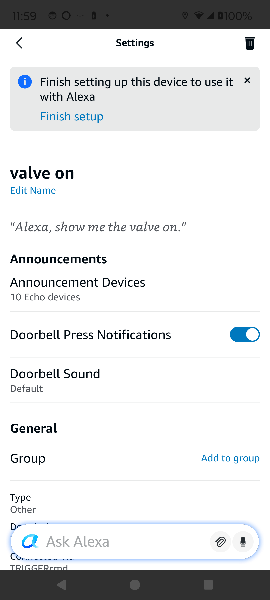
EDIT2: I added a feature to each device to allow you to disable the "Doorbell Press Notifications".
-
@Russ Yes, a permanent solution needs to be found. What I did is just a workaround because I was getting tired of Alexa saying "Someone is in front of..." every time I asked her to run a command.
-
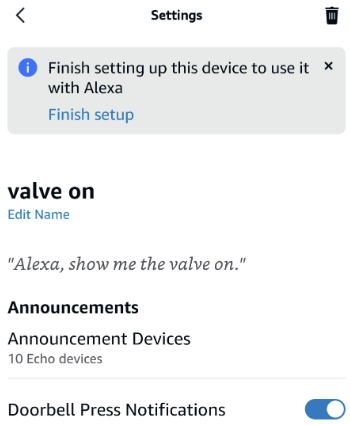
@Vinicius-Gimenez-Figuerola if you rename your command, and rename it back, it will re-create the Alexa device with this new UI option to disable the doorbell press notifications. Does that solve it? I tried to default it to false, but there doesn't seem to be a way to do that.
-
@Russ oohh the option to disable the doorbell press notification for me just appeared without I've done nothing and yes it works if I disable this Alexa won't notify anymore, very good

-
Awesome @Vinicius-Gimenez-Figuerola. Thanks for letting me know it's working for you.


Hello! It looks like you're interested in this conversation, but you don't have an account yet.
Getting fed up of having to scroll through the same posts each visit? When you register for an account, you'll always come back to exactly where you were before, and choose to be notified of new replies (either via email, or push notification). You'll also be able to save bookmarks and upvote posts to show your appreciation to other community members.
With your input, this post could be even better 💗
Register Login