TRIGGERcmd
    • Categories
    • Recent
    • Tags
    • Popular
    • Users
    • Groups
    • Search
    • Register
    • Login

    Problem: Run Call Of Duty Warzone

    Scheduled Pinned Locked Moved Windows
    28 Posts 4 Posters 10.6k Views 1 Watching
    Loading More Posts
    • Oldest to Newest
    • Newest to Oldest
    • Most Votes
    Reply
    • Reply as topic
    Log in to reply
    This topic has been deleted. Only users with topic management privileges can see it.
    • RussR Offline
      Russ @Arthur Oscar
      last edited by

      @Arthur-Oscar, I understand, but I can't make it work with or without TRIGGERcmd. I've tried everything. It won't click Play.

      Russell VanderMey

      Arthur OscarA 1 Reply Last reply Reply Quote 0
      • Arthur OscarA Offline
        Arthur Oscar @Russ
        last edited by

        @Russ i noticed when i tell to triggercmd to execute cod.bat file... it doesnt blink at the screen, it executes on background or something?

        RussR 1 Reply Last reply Reply Quote 0
        • RussR Offline
          Russ @Arthur Oscar
          last edited by Russ

          @Arthur-Oscar, you should add a line to your cod.bat that shows something on the screen or writes something to a log like this, so you know it's running.

          echo it ran >> c:\scripts\cod.log
          

          Also, make sure Ground = foreground.

          Russell VanderMey

          Arthur OscarA 2 Replies Last reply Reply Quote 0
          • Arthur OscarA Offline
            Arthur Oscar @Russ
            last edited by

            @Russ ill do it... btw i discovered why your result was returning 0 executing manually to you. try right click on au3 file and execute script as 64bits... after that... even .exe compiled 64bits runs okay.

            1 Reply Last reply Reply Quote 0
            • Arthur OscarA Offline
              Arthur Oscar @Russ
              last edited by

              @Russ
              Important information!!!!
              allmost solved problem!!!

              just need to run cod.exe inside SysWOW64 cmd prompt

              but to do this... i need edit cod.bat file

              cod.bat says:

              echo program running >> D:\alexa\cod\cod.log

              start "" c:\Windows\SysWOW64\cmd.exe >> D:\alexa\cod\cod.exe

              exit

              but ofc its not working yet... path is incorrect... there is any way to type the path inside the new cmd window? or... execute cmd from 64bit path directly?

              RussR 1 Reply Last reply Reply Quote 0
              • RussR Offline
                Russ @Arthur Oscar
                last edited by Russ

                @Arthur-Oscar please try this in your cod.bat:

                echo program running >> D:\alexa\cod\cod.log
                c:\Windows\SysWOW64\cmd.exe /c D:\alexa\cod\cod.exe
                

                That will run your cod.exe in the 32bit cmd.exe in the SysWOW64 folder.

                Russell VanderMey

                Arthur OscarA 2 Replies Last reply Reply Quote 0
                • Arthur OscarA Offline
                  Arthur Oscar @Russ
                  last edited by

                  @Russ this way its opening in system32 mode...
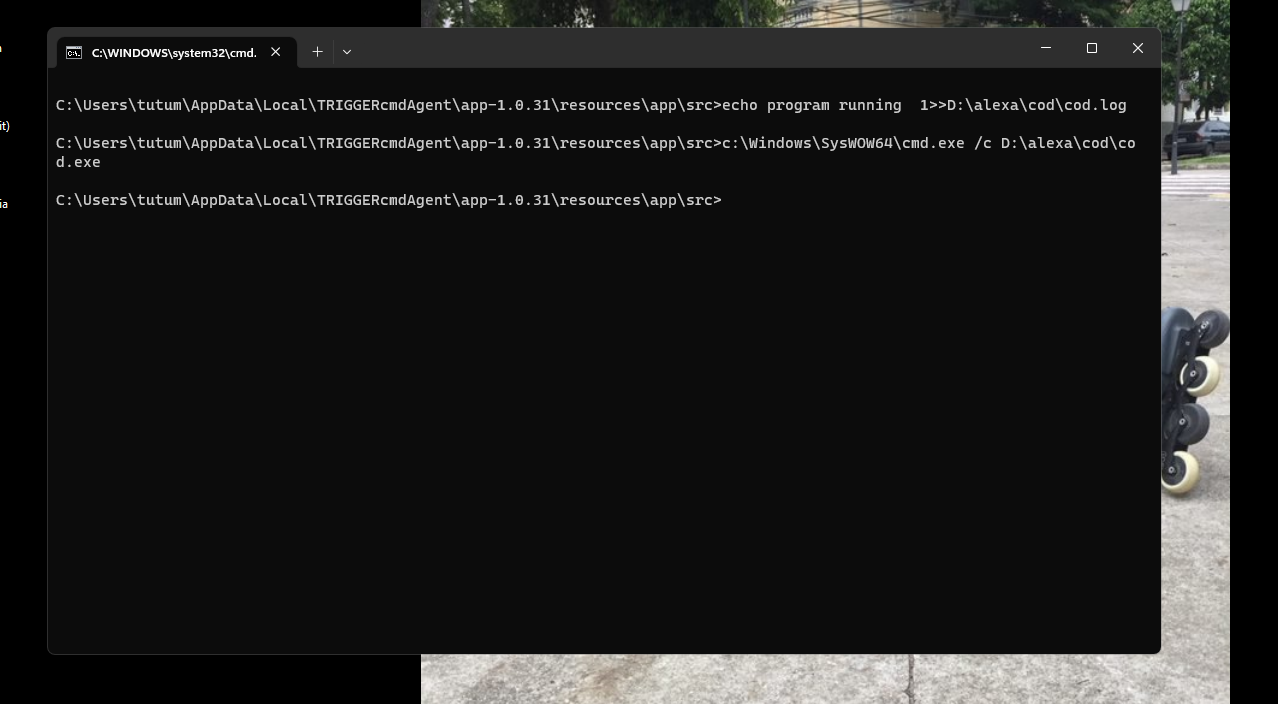
                  0d4e45f2-b356-4734-b155-1838f7a9faee-image.png
                  i need to execute those comands in cmd from syswow64.. like this other image
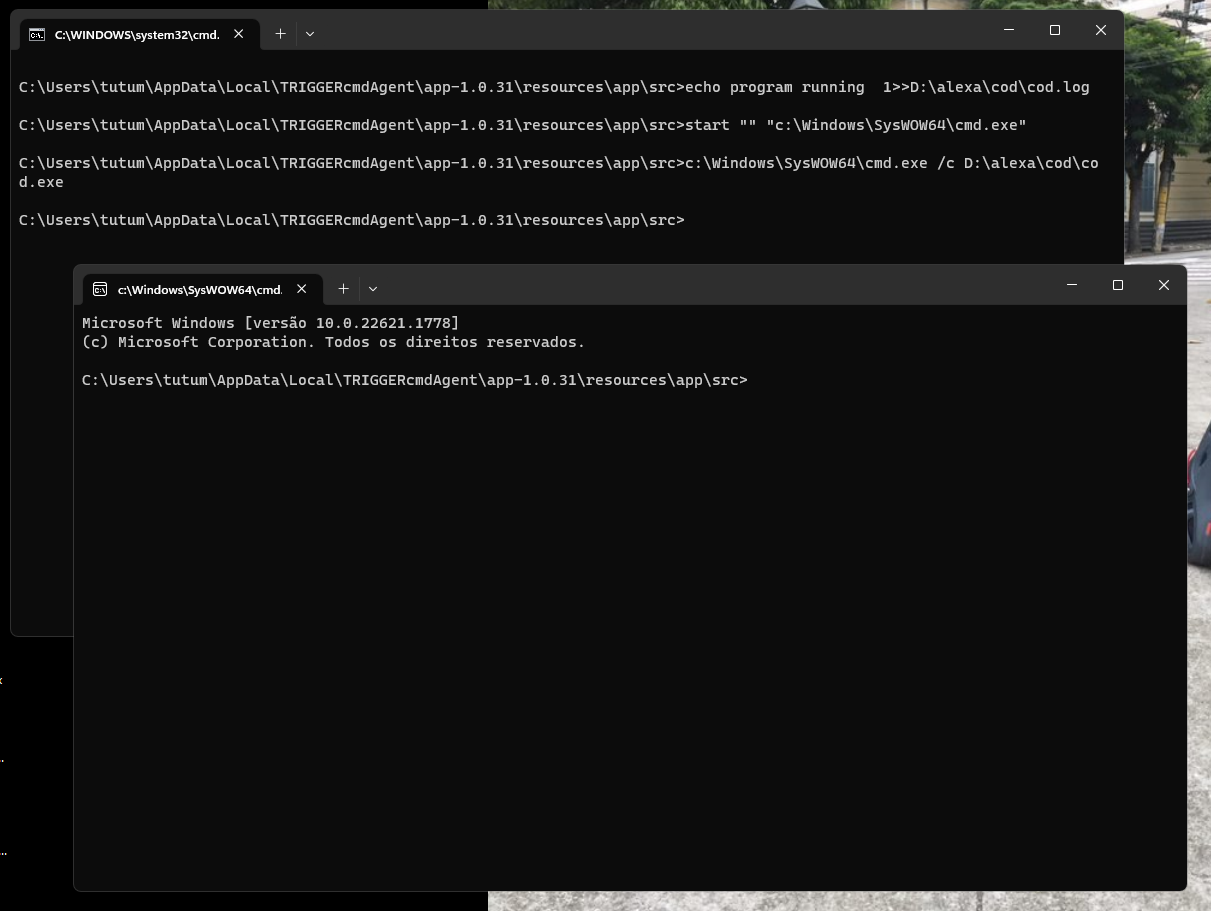
                  bd8505b2-583a-4129-8abe-56e2fb97bc38-image.png

                  1 Reply Last reply Reply Quote 0
                  • Arthur OscarA Offline
                    Arthur Oscar @Russ
                    last edited by

                    @Russ
                    I Finally Solve the problem...

                    first of all... no .bat is needed. thanks god! hahaha

                    1st step:
                    configurates to open a link to execute cod.exe (compiled)

                    237c9825-f30f-4f48-ba76-679bc05e520e-image.png

                    2nd step:
                    edit a link icon came from cmd (inside SysWOW64 folder) and put this link inside your folder

                    22446163-ce05-40f8-9f84-5e67655a0f2d-image.png
                    3rd step:
                    put the infos as following:
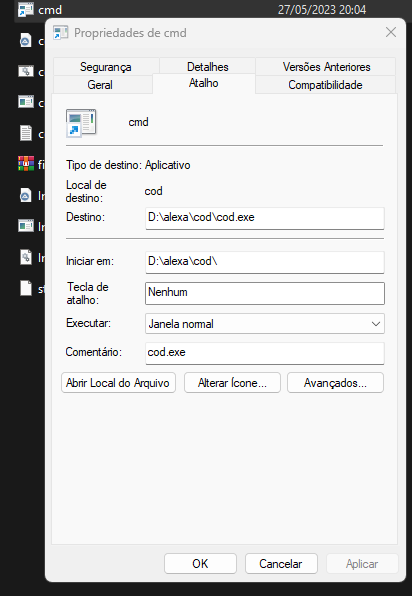
                    f8430959-df5e-474e-80da-6472534f7381-image.png

                    Files needed:
                    cmd.lnk (icon to run by triggercmd)
                    cod.au3 (script)
                    cod.exe(au3 compiled in 64bits)
                    imagesearch.au3
                    imagesearchDLL.dll
                    botao.png (image from button to press)
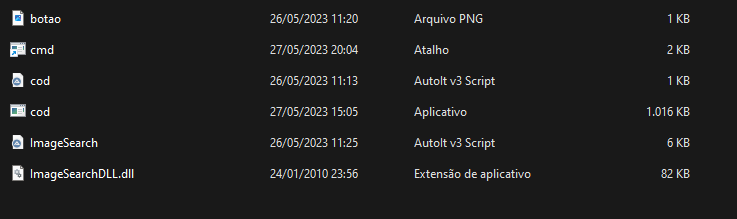
                    515d56b1-d489-4795-8ec9-51c7dbdd0d78-image.png

                    that's it...
                    Thanks @Russ to the help...
                    hope you enjoy @Luiz-Henrique-Dela-Giustina and all the others!

                    Arthur OscarA 1 Reply Last reply Reply Quote 0
                    • Arthur OscarA Offline
                      Arthur Oscar @Arthur Oscar
                      last edited by

                      Forgot to add all the files used

                      https://we.tl/t-4w8WHZAPBv

                      RussR 1 Reply Last reply Reply Quote 0
                      • RussR Offline
                        Russ @Arthur Oscar
                        last edited by

                        @Arthur-Oscar, awesome. I'm glad you got it working! Thanks for sharing your method and your files too.

                        Russell VanderMey

                        1 Reply Last reply Reply Quote 0
                        • Marcos BarquetM Offline
                          Marcos Barquet
                          last edited by

                          @Arthur-Oscar could you share the files again, thanks!

                          1 Reply Last reply Reply Quote 0

                          Hello! It looks like you're interested in this conversation, but you don't have an account yet.

                          Getting fed up of having to scroll through the same posts each visit? When you register for an account, you'll always come back to exactly where you were before, and choose to be notified of new replies (either via email, or push notification). You'll also be able to save bookmarks and upvote posts to show your appreciation to other community members.

                          With your input, this post could be even better 💗

                          Register Login
                          • First post
                            Last post