error with google routines
-
I cannot do routines with google home because when I go to take some command that I have created to activate or deactivate the option does not appear.
-
@ANDRES-ROJAS, I might be having the same problem you are. I tried creating a Google Assistant routine that flips one of the virtual switches on, but it won't allow me to select the switch now. I'll look into that, but there's another way that does work.
Here's what worked for me:
- Open the Home app
- Tap Routines
- Tap the + to create a routine
- Tap Personal
- Tap "Add starter"
- Tap "When I say to Google Assistant"
- Type "calculator"
- Tap "Add action"
- Tap "Try adding your own"
- Type "turn on calculator"
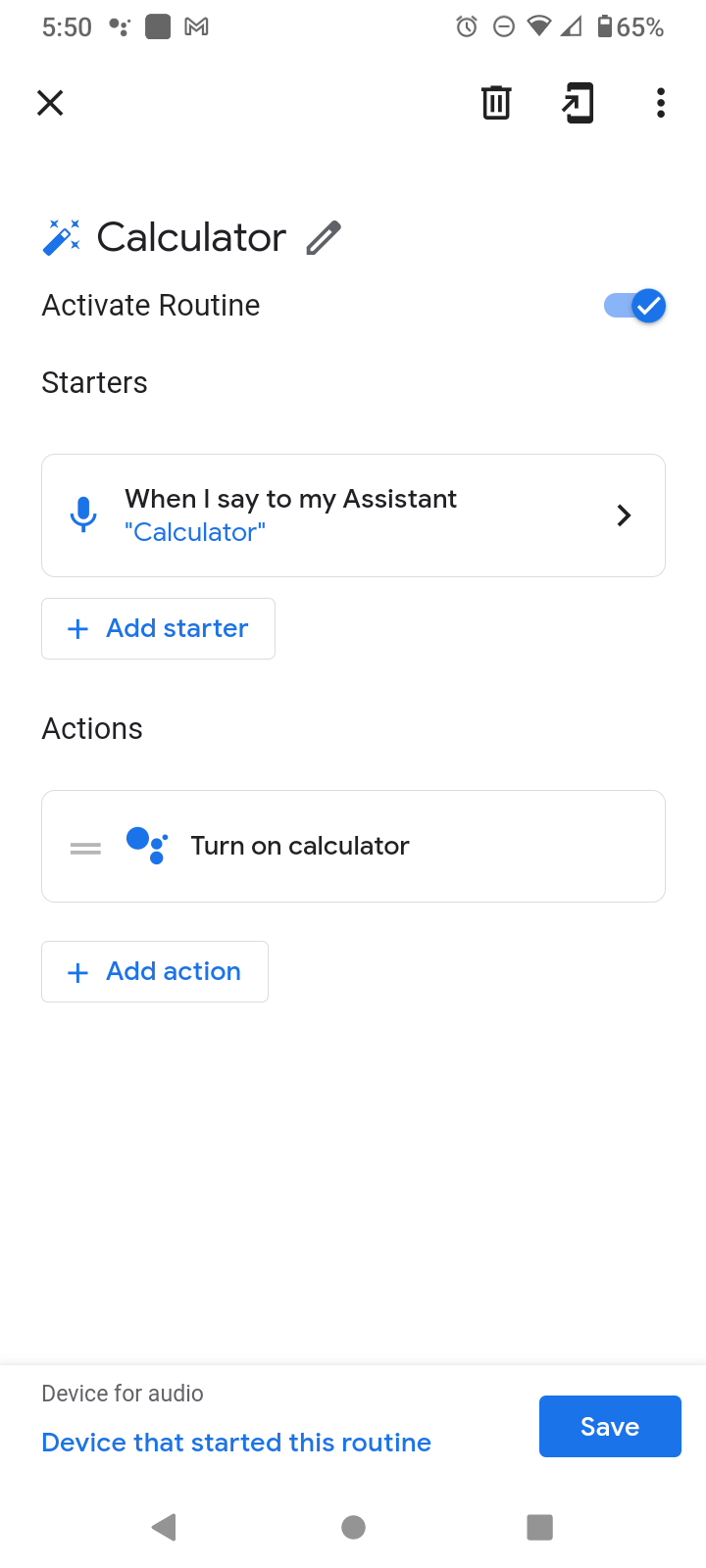
For this to work, you have to enable the TRIGGERcmd Smart Home action first.
-
 R Russ referenced this topic on

Hello! It looks like you're interested in this conversation, but you don't have an account yet.
Getting fed up of having to scroll through the same posts each visit? When you register for an account, you'll always come back to exactly where you were before, and choose to be notified of new replies (either via email, or push notification). You'll also be able to save bookmarks and upvote posts to show your appreciation to other community members.
With your input, this post could be even better 💗
Register Login