Is it possible to wake a laptop from sleep?
-
I created a .cmd file that puts my laptop to sleep but I cant figure out how to wake it up using TriggerCMD. I tried Wake on Lan but that didnt seem to work on my laptop. Any suggestions are greatly appreciated. My end goal is be able to turn on my laptop, PC and lights in my studio using on press on my iPhone/siri.
-
@sykramsounds, if the laptop is asleep, you can't run commands on it because it's not even connected to the internet when it's asleep.
If it's on but just the display is off, you could still run commands, including the command to turn the display back on. I assume you have a mac? If so, these are the commands:
Display off:  pmset displaysleepnow
Display on:   caffeinate -u -t 1
Or better yet, do this:
-
How are you? Everything ok? Can you help me?
In triggercmd how can I insert the command turn on screen and turn off screen in the same command configuration? -
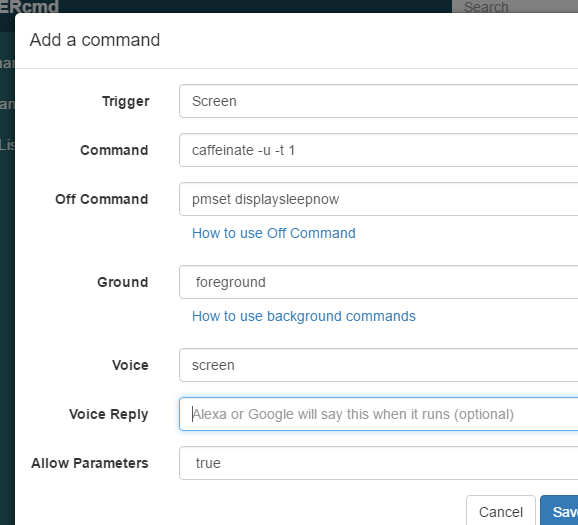
@Bráulio-Betônico, it should look like this. Notice I set "Allow Parameters" to true so I could use the Off Command field:
-
It worked. Thank you so much again.
-
@Bráulio-Betônico, no problem. Thanks for the question. I'm glad you asked.


Hello! It looks like you're interested in this conversation, but you don't have an account yet.
Getting fed up of having to scroll through the same posts each visit? When you register for an account, you'll always come back to exactly where you were before, and choose to be notified of new replies (either via email, or push notification). You'll also be able to save bookmarks and upvote posts to show your appreciation to other community members.
With your input, this post could be even better 💗
Register Login