TRIGGERcmd
    • Categories
    • Recent
    • Tags
    • Popular
    • Users
    • Groups
    • Search
    • Register
    • Login

    ps4-waker command

    Scheduled Pinned Locked Moved Windows
    6 Posts 2 Posters 1.2k Views 1 Watching
    Loading More Posts
    • Oldest to Newest
    • Newest to Oldest
    • Most Votes
    Reply
    • Reply as topic
    Log in to reply
    This topic has been deleted. Only users with topic management privileges can see it.
    • Marcelouw GamePlayM Offline
      Marcelouw GamePlay
      last edited by

      Hello,

      I would like to help, as I am unable to make the ps4-waker command run on triggercmd!
      I did all the procedures correctly, the command works by cmd of windows, but by Trigger nothing happens. I even tried to create a .bat file with the command and it still doesn't work.
      Does anyone know why? I'm a new user of the app.
      Thank you!

      RussR 1 Reply Last reply Reply Quote 0
      • RussR Offline
        Russ @Marcelouw GamePlay
        last edited by

        @Marcelouw-GamePlay, please post your .bat file. You might need to specify the full path to the ps4waker.exe file when you run it.

        Russell VanderMey

        1 Reply Last reply Reply Quote 0
        • Marcelouw GamePlayM Offline
          Marcelouw GamePlay
          last edited by

          I created the command with the path of the .bat file

          the file itself, i just put the command "ps4-waker" (because only the command in cmd worked normally)

          sorry for the ignorance, but I'm new to all this!
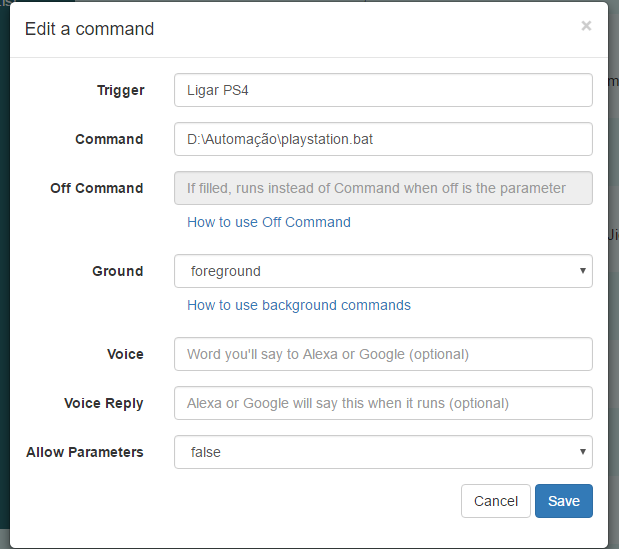
          6451d2a0-57ad-4d7d-a9b1-285161217183-image.png

          c2365706-8dfa-4eea-b139-c11955550cb8-image.png

          RussR 1 Reply Last reply Reply Quote 0
          • RussR Offline
            Russ @Marcelouw GamePlay
            last edited by

            @Marcelouw-GamePlay, thanks.

            It actually worked for me when I put it in the Command field directly. I didn't need a .bat file.
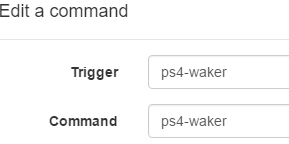
            d0d9e006-2455-4cee-9304-c0c9dadc9bdd-image.png

            If that doesn't work for you you could also try this command:

            node %APPDATA%\npm\node_modules\ps4-waker\dist\cli.js
            

            If you use a batch file I suggest you remove the start line. It's not needed and just opened a cmd window for me when I tried it.

            BTW, for anyone reading this, I installed ps4-waker with this command (I already had nodejs installed):

            npm i -g ps4-waker
            

            Russell VanderMey

            Marcelouw GamePlayM 1 Reply Last reply Reply Quote 0
            • Marcelouw GamePlayM Offline
              Marcelouw GamePlay @Russ
              last edited by

              @Russ

              Hello!

              I managed to make it work!
              I don't know if it was when I changed the name of the trigger or when I used the first command you passed.
              but now it's working as it should!

              Thank you!

              RussR 1 Reply Last reply Reply Quote 0
              • RussR Offline
                Russ @Marcelouw GamePlay
                last edited by

                @Marcelouw-GamePlay, awesome. I'm glad it's working.

                Russell VanderMey

                1 Reply Last reply Reply Quote 0

                Hello! It looks like you're interested in this conversation, but you don't have an account yet.

                Getting fed up of having to scroll through the same posts each visit? When you register for an account, you'll always come back to exactly where you were before, and choose to be notified of new replies (either via email, or push notification). You'll also be able to save bookmarks and upvote posts to show your appreciation to other community members.

                With your input, this post could be even better 💗

                Register Login
                • First post
                  Last post