-
Hi there, I'm new to this and trying to simply run a single mp3 file,
i write this command cmd /c "c:\music\my song.mp3" in the command window and save, but it doesn't' seem to work (i have added an mp3 file called my song.m p3 in the correct location
thanks for any help!
-
@benzil, try this. Just put the full path of the .mp3 file in quotes in the Command field, like this:

That worked for me.
-
thank you very much,
bu t it doesnt seem to work for me

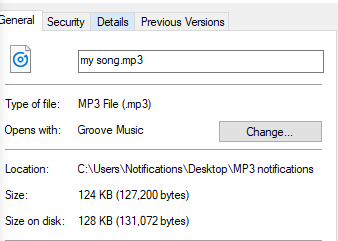
=============
however this one does, so i don't think it's my audio player
any ideas?
my best
Ben -
@benzil, I switched to a computer where Groove is my default mp3 player, and it worked for me to use the quoted full path to he mp3 file, but then I googled and found this page that suggested this command line:
cmd /c start "explorer.exe shell:C:\Program Files\WindowsApps\Microsoft.ZuneMusic_3.6.25021.0_x64__8wekyb3d8bbwe!Microsoft.ZuneMusic" "C:\Users\Russ\Music\03 - Take a Chance on Me.mp3"

Hello! It looks like you're interested in this conversation, but you don't have an account yet.
Getting fed up of having to scroll through the same posts each visit? When you register for an account, you'll always come back to exactly where you were before, and choose to be notified of new replies (either via email, or push notification). You'll also be able to save bookmarks and upvote posts to show your appreciation to other community members.
With your input, this post could be even better 💗
Register Login