Subcategories

  • A place to share commands you like to trigger remotely.

    35 Topics
    243 Posts
    RussR
    @eromano, I tried to install OpenWRT on a VMWare VM for a while. I got version 15 installed using an OVA but I couldn't get openssl working, so I couldn't install nodejs etc on it. Anyway, I noticed your error output shows it's trying to access a URI that starts with /engine.io . That's not valid URI. I wonder if you've upgraded socket.io-client beyond the version specified in ubuntupackage.json because this article says the latest version 'socket.io-client@4.X.X uses /engine.io instead of the valid /socket.io URI.
  • A place to share commands you like to trigger remotely.

    44 Topics
    135 Posts
    G
    IMPORTANT NOTE on above you must make the sendresult.sh bash script executable. go to terminal and: cd ~/.TRIGGERcmdData/ chmod +x sendresult.sh
  • A place to share commands you like to trigger remotely.

    263 Topics
    1k Posts
    RussR
    @Alisson-Teixeira, I translated that as: "I would like to know if it's possible to turn off the monitor and the computer at the same time with just one command? In the free version? With the example command, the monitor enters power saving mode, but doesn't turn off completely... Question for Windows please" You can run multiple commands in one command by putting && between commands, like this: nircmd.exe monitor off && shutdown /s /t 10
  • A place to share commands you like to trigger remotely.

    27 Topics
    72 Posts
    ?
    Calculadora Alicia es una herramienta increíblemente útil para realizar cálculos rápidos y precisos, perfecta para tareas financieras, matemáticas y más. Su diseño intuitivo permite a los usuarios resolver problemas complejos sin complicaciones, ahorrando tiempo y esfuerzo. Si estás buscando una solución confiable, te invito a visitar Calculadora Alicia para explorar todas sus funciones y beneficios.
  • RGB AURA SYNC

    1
    0 Votes
    1 Posts
    860 Views
    No one has replied
  • Open youtube link on any browser & play using autohotkey😎

    1
    0 Votes
    1 Posts
    966 Views
    No one has replied
  • Laptop Battery Management - Automated On/Off Cycle

    9
    0 Votes
    9 Posts
    5k Views
    xlPatriciaX
    Hello! I was using this script on my laptop and it was working normally. After formatting it this afternoon, I reinstalled everything again and got tcmd to work as it was before, but now it is not reading the battery %, it just keeps activating plugOn all the time regardless of how much battery is left. I don't understand scripts, so I apologize in advance for not being able to provide more information or details. If anyone can help me, I would be grateful. Just to let you know, I followed all the steps described here. I have tcmd utility in the C:\Windows folder, I downloaded BatteryInfoView.exe, I configured plugOn and plugOff in trigger_cmd and in Alexa and even so only plugOn is activated in a loop with Alexa's routines. Oh, and I apologize for having revived the topic. I thought it best to leave everything in the same place.

  • Click & input on Screen Desktop

    3
    0 Votes
    3 Posts
    1k Views
    pongsatonn siripetP
    @Russ I'll try doing what you suggested. I will update it later. Thank a lots.
  • How to setting ifttt

    4
    0 Votes
    4 Posts
    1k Views
    RussR
    @pongsatonn-siripet are you saying you cannot get to the GUI Command Editor? That's where you should see "+ Add Command", "+ Browse Example", and "+ Computer List You should have a TRIGGERcmd tray icon if you click the up arrow in the lower-right near your clock. Here's a screenshot where I right-clicked my TRIGGERcmd tray icon. You can see the "GUI Command Editor" in the menu. [image: 1725194203716-009faa08-7913-48af-a366-c322a2f36b22-image.png]
  • 1 Votes
    1 Posts
    1k Views
    No one has replied
  • Remotely update batch file

    1
    0 Votes
    1 Posts
    870 Views
    No one has replied
  • Como usar o Nircmd?

    5
    0 Votes
    5 Posts
    4k Views
    RussR
    @Xander, good point.
  • Demo of TRIGGERcmd with Alexa and Song Master

    3
    0 Votes
    3 Posts
    1k Views
    Steve LeeS
    @Russ Good idea, thanks! I've yet to explore routines. They do increases the number of places to configure though. And no nice text file way with Alexa! I did try adding words to created a new command mac setlist ... mac setlist next But it doesn't work due to the way Alexa always matches the first one So I'd have to add multiple 3 word items. Yuck Shame we can add out own lexicon I was going to use Routines for repeat timers but on reading the docs they don't take parameters which really limits them for all applications
  • Execute IFTTT in windows

    3
    0 Votes
    3 Posts
    2k Views
    RussR
    @Mauro, @Matt-Packwood's solution would work, but here's another option. You could create an IFTTT applet with TRIGGERcmd as the THIS part. Pick Specific command and choose one of your TRIGGERcmd commands. It doesn't matter what it does because all you care about is the fact that it will run your IFTTT applet. This is a built-in function of the TRIGGERcmd IFTTT integration: [image: 1693569627220-f53b5c93-57ec-48dc-82de-cab91ff289c9-image.png] Then, if you want to run a command on your Windows PC that will trigger that TRIGGERcmd command that will start the IFTTT applet, you could run that TRIGGERcmd command using the tcmd command line tool.
  • Multiple voice commands

    7
    0 Votes
    7 Posts
    2k Views
    Steve LeeS
    @Russ I've been thinking of using alexa routines, to simplify my command collection. As far as I can see they can't take parameters though, so you need to create multiple similar named routines. Also, as pointed out its a million clicks as they only provide a gui interface, not a nice text based one. Thank goodness TRIGGERcmd has a text file!
  • Como abrir VS Code pelo CMD? / How to open vscode in cmd?

    3
    0 Votes
    3 Posts
    3k Views
    RussR
    @William, I'm glad you found it. For anyone else who wants to create a command to open VS Code: [image: 1667423694853-f6f81462-0755-4625-8177-dd83b220a9aa-image.png]
  • smartthings-cli

    4
    1 Votes
    4 Posts
    3k Views
    Toivo SokkaT
    @Russ The problem was not the paths. It turned out that smartthings-cli wanted a fresh login by root. I tried logging in to GUI with root, but was unable to initiate the login prcess that way. But typing --token <uuid> after each command did the trick! (<uuid> being the token from https://account.smartthings.com/tokens) Cron and other services that start at boot are still unable to run the commands. Now I get "Error: did not get any data from stdin". I bypassed the problem by running a python script manually. This script stays open and executes the smartthings commands as needed. The downside is that if the power goes out and RasPi reboots the script does not run automatically.
  • Respaldo?

    3
    0 Votes
    3 Posts
    1k Views
    A
    @Oscar-Mro Under Windows: open TCMD's "Text Command Editor" with a right-click on its notification bar icon. It is displaying the path/location of the "command.json" file that contains your TCMD configuration. Save a copy of that file. Or cut&paste the editor's content into a text file of the same name. Google translation: En Windows: abra el "Editor de comandos de texto" de TCMD haciendo clic con el botón derecho en el icono de la barra de notificaciones. Muestra la ruta/ubicación del archivo "command.json" que contiene su configuración de TCMD. Guarde una copia de ese archivo. O corta y pega el contenido del editor en un archivo de texto con el mismo nombre. HTH
  • Get a text for each command trigger.

    1
    2
    0 Votes
    1 Posts
    781 Views
    No one has replied
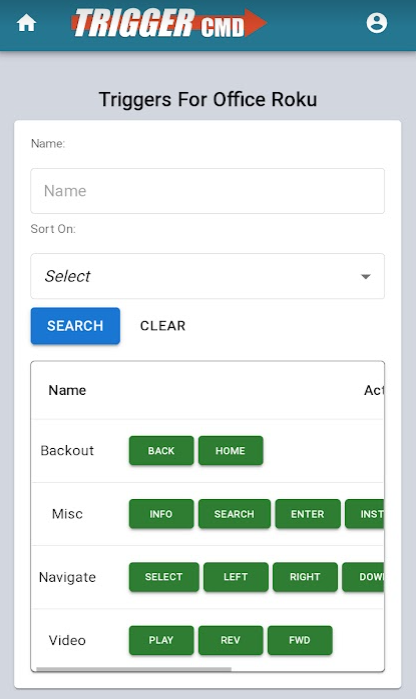
  • Control your Roku

    1
    3
    0 Votes
    1 Posts
    7k Views
    No one has replied
  • Voice controlling X10 Pan&Tilt WiFi Cameras

    x10 homegenie
    1
    1 Votes
    1 Posts
    1k Views
    No one has replied
  • Abrindo o CS:GO

    4
    0 Votes
    4 Posts
    3k Views
    RussR
    @Igor-Brum, this command works for me for CSGO: "c:\Program Files (x86)\Steam\steam.exe" "steam://rungameid/730"
  • This topic is deleted!

    1
    0 Votes
    1 Posts
    12 Views
    No one has replied
  • Suspend

    2
    0 Votes
    2 Posts
    2k Views
    RussR
    @Mateus-Alves, I learned from here that this command will hybernate your computer by default. rundll32.exe powrprof.dll,SetSuspendState 0,1,0 But, if you first run this command in an elevated cmd window (that your ran by right clicking Command Prompt, and clicking "Run as administrator"), the above command will suspend your computer instead of hybernate it. powercfg -hibernate off If anyone reading this doesn't know the difference between suspend and hybernate: Suspend does not turn off your computer. It puts the computer and all peripherals on a low power consumption mode. If the battery runs out or the computer turns off for some reason, the current session and unsaved changes will be lost. Hibernate saves the state of your computer to the hard disk and completely powers off. When resuming, the saved state is restored to RAM. I found that here.