TRIGGERcmd
    • Categories
    • Recent
    • Tags
    • Popular
    • Users
    • Groups
    • Search
    • Register
    • Login
    1. Home
    2. Edwin Zahra
    Edwin ZahraE Offline
    • Profile
    • Following 0
    • Followers 0
    • Topics 1
    • Posts 6
    • Groups 0

    Edwin Zahra

    @Edwin Zahra

    0
    Reputation
    2
    Profile views
    6
    Posts
    0
    Followers
    0
    Following
    Joined
    Last Online

    Edwin Zahra Unfollow Follow
    • RE: Reregistering Triggercmd on a New PC and copying across all commands

      Thanks alot, last question:

      Only way to use a voice command of "run (skill)" as a default, instead of turn on "(skill)" is thru Alexa, cant be done within triggercmd? Seems weird saying "Turn on shutdown".

      FYI most commands work by saying "run", not sure why shutdown doesnt work.

      Thanks for all ur help
      posted in General Discussion
      Edwin ZahraE
      Edwin Zahra
    • RE: Reregistering Triggercmd on a New PC and copying across all commands

      @Russ I think you may be answering someone's question?

      However it is useful as the profile has setting for the default computer.

      posted in General Discussion
      Edwin ZahraE
      Edwin Zahra
    • RE: Reregistering Triggercmd on a New PC and copying across all commands

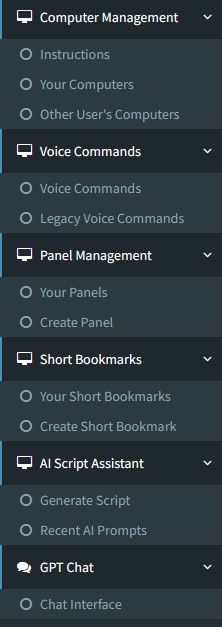
      Sorry Im not seeing this screen, went thru every menu item. Im guessing its some where under computer management ? Looks like you have an extra line under Computer Management. Can you please advise path or settings to get to this screen. Below is what showing in my client.

      676de84f-eead-42c1-90d8-11d1f8b4c07e-image.jpeg

      Also, not sure if this is related, when I say power on (pc name), Alexa says something along the lines, enable the skill for this device, but still boots up?

      Thanks

      posted in General Discussion
      Edwin ZahraE
      Edwin Zahra
    • RE: [BUG] I`m adding new commands and it`s executes the command but Alexas threats as a doorbell

      Im getting the same issue. I installed on my new pc and copied across commnds from my old pc today

      Will this bug be fixed? Only happens with triggercmd.

      I dont mind it if i can use my own custom sound and have the option to disable the voice message someone is at ......

      Thanks

      posted in General Discussion
      Edwin ZahraE
      Edwin Zahra
    • RE: Reregistering Triggercmd on a New PC and copying across all commands

      I ended up deleting the computer from my account, uninstalling trigger from pc and deleting the trigger directory user settings.

      Lucky I had a copy of my settings/commands from my old pc. I copied across the file contents and it worked.

      Has to be an easier as all that is technically changing is the MAC address?

      Also, if u use my than 1 PC do u need to create a shutdown command for each PC and edit the voice command to include the PC name or and will it work by using 1 shutdown command and simply say "shutdown (computername)"

      Thanks

      posted in General Discussion
      Edwin ZahraE
      Edwin Zahra
    • Reregistering Triggercmd on a New PC and copying across all commands

      Hi

      My old PC died and I want to reregister TriggerCmd on my new pc and make sure it is working before I pay for a yearly subs.

      I have an image of the old PC on my new PC. I can see all my commands showing in the commands.json file from the image.

      So the only way is to delete the PC showing under my account and add the new PC and copy accross the contents from the commands.json file?

      If so when I delete the PC will there be an option to add a PC, I cent see any option currently to add a PC

      Can you somehow just edit the MAC address somewhere?

      Thanks

      posted in General Discussion
      Edwin ZahraE
      Edwin Zahra