Unexpected token W in JSON at position 273
-
I'm trying to get my computer to sleep on command.
This is my command line"trigger": "Sleep",
"command": "C:\Windows\System32\psshutdown /d /t 1",
"ground": "background",
"voice": "Sleep",When I tell it to run a java error pops up with "Unexpected token W in JSON at position 273" and when I write psshutdown \d \t 1 without the whole directory nothing happens.
Thanks, Jaxon
-
@Jaxon-T, I think I know why you're seeing that error:
For proper json formatting, the backslashes in your command path need to be double-backslashes, like this:
"command": "C:\\Windows\\System32\\psshutdown /d /t 1", -
After I did what you said it happened again except this time it said
Unexpected token } in JSON at position 132
the whole text command editor is just
[
{
"trigger": "Sleep",
"command": "C:\Windows\System32\psshutdown /d /t 1",
"ground": "background",
"voice": "Sleep",
}
]btw i tried psshutdown with and without .exe at the end so the other text editor looks like
[
{
"trigger": "Sleep",
"command": "C:\Windows\System32\psshutdown.exe /d /t 1",
"ground": "background",
"voice": "Sleep",
}
] -
btw when i copy and paste the text it takes away the double slash so these are double slashed!
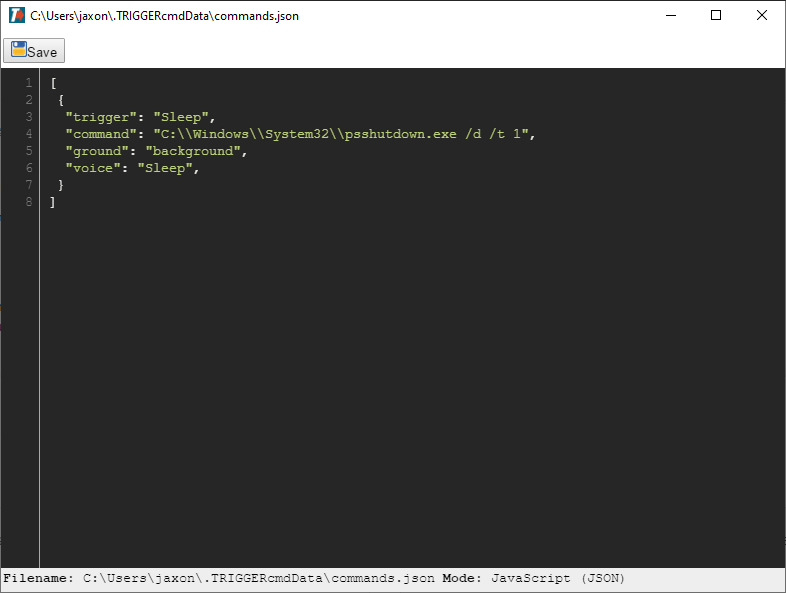
-
@Jaxon-T, if you use three of these "back ticks" ` before and after your text, it will show it as a code block and keep any backslashes intact.
Like this:
 {
  "trigger": "sleep",
  "command": "d:\\tools\\pstools\\psexec -h C:\\\\Windows\\System32\\psshutdown.exe /d /t 1",
  "offCommand": "",
  "ground": "background",
  "voice": "sleep",
  "voiceReply": "",
  "allowParams": "false"
 }
I tried your command and it didn't work because of UAC. You'll notice I ran it with psexec -h. That worked because it's running as a background command which runs it as Local System which has access to run things "As Administrator" with psexec -h.


Hello! It looks like you're interested in this conversation, but you don't have an account yet.
Getting fed up of having to scroll through the same posts each visit? When you register for an account, you'll always come back to exactly where you were before, and choose to be notified of new replies (either via email, or push notification). You'll also be able to save bookmarks and upvote posts to show your appreciation to other community members.
With your input, this post could be even better 💗
Register Login