Help understanding how to create new commands
-
Hi, I just got this, and so far I'm absolutely fascinated with TriggerCMD, but I need help understanding how to create commands. I'm trying to look for a guide for help, but I'm having an issue finding one.
-
@TheValkyrieAsh, I think your best bet is to watch some of the Youtube videos.
If you got the TRIGGERcmd agent installed, you should be able to right-click the tray icon in the lower right near your clock, and select "GUI Command Editor". You'll probably have to click the up arrow to reveal the tray icon.
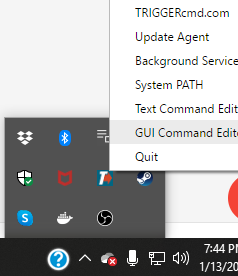
Please let me know how it goes.


Hello! It looks like you're interested in this conversation, but you don't have an account yet.
Getting fed up of having to scroll through the same posts each visit? When you register for an account, you'll always come back to exactly where you were before, and choose to be notified of new replies (either via email, or push notification). You'll also be able to save bookmarks and upvote posts to show your appreciation to other community members.
With your input, this post could be even better 💗
Register Login