Zapier + triggercmd + Alexa workflow help
-
Hello,
I'm looking for some guidance on my first triggercmd application.
Background: I run an automated sports facility that uses TPlinkKasa's to turn on and off projectors. My current method uses "schedules" in TPlink Kasa's API to follow bookings and changes in bookings. The issue is that Kasa only allows schedules up to 7 days in advance and also triggers are every minute, so the device cannot turn off at HH:MM:SS (ie (07:00:00), and then turn on at (07:00:01) . instead, the devices need to turn off at 07:00:01 and then turn on at 07:01:00 . You can see how this creates a problem for extended bookings or any back to back bookings where people dont want that 1 miute delay. Also when someone books at 7am, they expect to start at 7am , not 7:01am.I was thinking the solution for this, and also the "max 7 days advance booking" problem, is to use kasa via Alexa, via TriggerCMD.
I understand the workflow, I just dont know how to set this up, as I'm no coder at all.
- new skedda booking
- pull data of booker, phone number, start time, end time, projector #
- put this all into a google sheets data base
- have triggercmd send a command to alexa to turn the specific projector # at the specific time.
- IF a booking is cancelled, or gets editted, then I would receive an email.
- Parse that email for the new information and update the start / end times.
- If the booking is cancelled, then delete the row, and triggercmd wont run at all.
- when the end time happens, then trigger a new alexa command to turn off the projector.
- if there is a back to back booking, immediately turn the projector back on.
[OR , use some webscraper to check to see if theres a back to back booking, and if there is, then skip turning off the projector]
Any help is appreciated!!
-
@Gary-Luk, this should be doable.
The first step I would tackle, if you haven't already, is to create an "on" Alexa routine that turns your Kasa plug on when you trigger a command, then do the same for "off". This Youtube video shows how to connect Alexa routines to TRIGGERcmd triggers. It requires the TRIGGERcmd Smart Home Alexa skill to be enabled first.
For the script, I asked the TRIGGERcmd AI Script Assistant this:
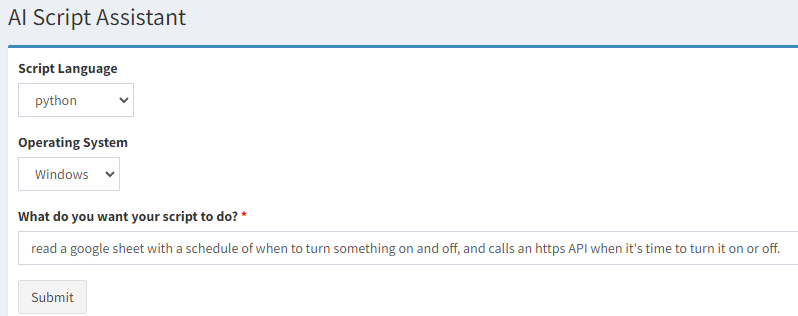
This was the response:
import gspread
from oauth2client.service_account import ServiceAccountCredentials
import requests
import time

# Set up credentials to access Google Sheets API
scope = ['https://spreadsheets.google.com/feeds', 'https://www.googleapis.com/auth/drive']
creds = ServiceAccountCredentials.from_json_keyfile_name('path/to/credentials.json', scope)
client = gspread.authorize(creds)

# Open the Google Sheet with the schedule
sheet = client.open('Schedule').sheet1

# Loop through the rows of the schedule
while True:
    for row in sheet.get_all_records():
        # Get the current time
        current_time = time.strftime('%H:%M')

        # Check if it's time to turn something on
        if current_time == row['On Time']:
            # Call the HTTPS API to turn something on
            response = requests.post('https://api.example.com/turn-on')

        # Check if it's time to turn something off
        if current_time == row['Off Time']:
            # Call the HTTPS API to turn something off
            response = requests.post('https://api.example.com/turn-off')

    # Wait for 1 minute before checking the schedule again
    time.sleep(60)
You'll need to replace that generic API example with one that calls the trigger command API instead.


Hello! It looks like you're interested in this conversation, but you don't have an account yet.
Getting fed up of having to scroll through the same posts each visit? When you register for an account, you'll always come back to exactly where you were before, and choose to be notified of new replies (either via email, or push notification). You'll also be able to save bookmarks and upvote posts to show your appreciation to other community members.
With your input, this post could be even better 💗
Register Login