shutdown pc not working Plsss
-
Hi, I've been using trigger cmd for over 2 years and it's only for a single function. shutdown PC. And in the mornings, I open the pc with google assistant without trigger cmd, but for a few days, I noticed that the computer did not turn off, the time it was open was more than 4 days. The important thing for me is trigger cmd, I only use the closing feature, not the opening feature. but as I said, it has not shut down for 4 days and I tried many things, but the pc does not turn off at all. Even try to turn it off manually with the GUI, it still didn't turn it off. trigger cmd deleted all data but still works in the same state If there is no solution, I will format the computer and try. I tried every article but it still didn't work Thanks in advance.
-
@mevlüt-bora, you wrote, "Even try to turn it off manually with the GUI, it still didn't turn it off." That information helps narrow it down.
Are you using this command to shutdown?
shutdown /s /t 60If so, can you try that in a cmd window like this?
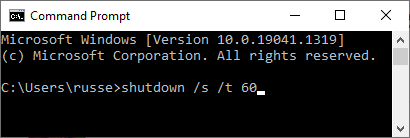
I wonder if that will give an error - like maybe it doesn't have access to shutdown.
Russell VanderMey
-
@mevlüt-bora there are several reasons a windows PC will refuse to shut down A failed update is usually the reason. However here are a few things you can try. https://www.minitool.com/backup-tips/windows-10-wont-shut-down.html
-
@Russ
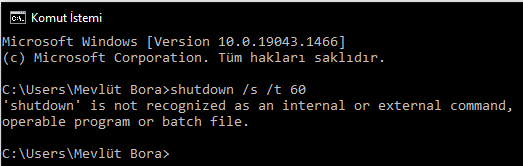 Thank you for your quick reply. But unfortunately that didn't work either
 -
@tuicemen Thanks for the help but it didn't work

-
@mevlüt-bora, try solution# 8 from this link
https://recoverit.wondershare.com/computer-problems/my-pc-wont-turn-off-or-shut-down.html -
@tuicemen I tried a few fixes but no success. Thank you for your support. I will try formatting.
-
@mevlüt-bora ,if you have the Windows 10 install disk you can do a system repair from it.



Hello! It looks like you're interested in this conversation, but you don't have an account yet.
Getting fed up of having to scroll through the same posts each visit? When you register for an account, you'll always come back to exactly where you were before, and choose to be notified of new replies (either via email, or push notification). You'll also be able to save bookmarks and upvote posts to show your appreciation to other community members.
With your input, this post could be even better 💗
Register Login