TriggerCmd installed as normal, but not running my commands
-
I'm trying to make the commands work, but it's not working at all.
When I go to my account, and click to view runs, it shows this error: "Command ran with error code 1"
Anyone know how to fix it?
Thanks!
-
@Matheus-de-Souza, it's showing "Command ran with error code 1" because your command is failing. Commands return error code 0 when they succeed.
To troubleshoot, it would help to get the output of your command. You should be able to see the error if you run it manually from a cmd prompt.
To open a cmd prompt, you can hold the Windows key and press R, then type cmd and press enter.
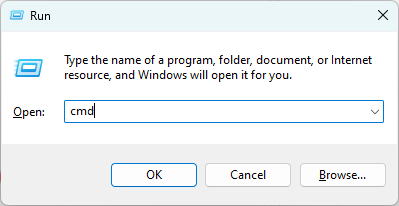
If the command runs fine in the cmd prompt but it fails when you run it with the TRIGGERcmd agent, you should copy/paste your command into a .bat file and redirect the command's output to a log file, and change your triggercmd command to run the .bat file. That way you can look in the log file to see the error.
For example, you could create a script.bat file with these contents:
yourcommand > c:\logs\script.log 2>&1This part is to make stderr output go into your log, not just stdout: 2>&1
Notice I put the log file in a c:\logs directory. You'll need to create that directory first. Windows won't let you write to a file in c:\ by default.


Hello! It looks like you're interested in this conversation, but you don't have an account yet.
Getting fed up of having to scroll through the same posts each visit? When you register for an account, you'll always come back to exactly where you were before, and choose to be notified of new replies (either via email, or push notification). You'll also be able to save bookmarks and upvote posts to show your appreciation to other community members.
With your input, this post could be even better 💗
Register Login