Randomly open application
-
I would like to know how to create a command to randomize and open selected applications, example: I have a command to open some steam games, but individually, I wanted to give a command, the games that I selected one of them would be opened at random.
-
@AwayShift, you can use a .bat file like this to randomly run one of 5 games.
set /a num=%random% %%5 +1 goto %num% :1 echo Running game 1 goto end :2 echo Running game 2 goto end :3 echo Running game 3 goto end :4 echo Running game 4 goto end :5 echo Running game 5 goto end :end -
It worked as I expected, thank you very much. Another question would it be possible for alexa to speak the game she is opening? if there is no way, no problem, it helped me a lot!
-
@AwayShift, yes, you can have Alexa (or Google Assistant) say the name of the game if you use one of the original skills - the ones called TRIGGERcmd or TRIGGER command. In general I like the TRIGGERcmd Smart Home skill better, but it cannot speak the "result" of a command.
Make each game's section in the .bat file like this:
:1
echo Running Call of Duty
%USERPROFILE%\.TRIGGERcmdData\sendresult.bat "Call of Duty"
goto end
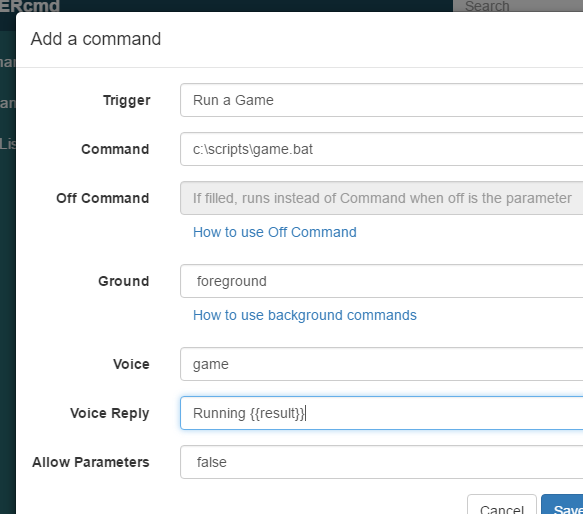
Set your command's "Voice Reply" field to something like this: Running {{result}}
Trigger the command via the TRIGGERcmd or TRIGGER command skill like this: "Alexa, ask TRIGGERcmd to run game."
The skill will reply with, "Running Call of Duty".
-
@Russ Perfect, it worked just fine, thank you very much for your help!


Hello! It looks like you're interested in this conversation, but you don't have an account yet.
Getting fed up of having to scroll through the same posts each visit? When you register for an account, you'll always come back to exactly where you were before, and choose to be notified of new replies (either via email, or push notification). You'll also be able to save bookmarks and upvote posts to show your appreciation to other community members.
With your input, this post could be even better 💗
Register Login