TRIGGERcmd
    • Categories
    • Recent
    • Tags
    • Popular
    • Users
    • Groups
    • Search
    • Register
    • Login

    TRIGGERcmd not starting at boot

    Scheduled Pinned Locked Moved General Discussion
    50 Posts 8 Posters 20.1k Views 2 Watching
    Loading More Posts
    • Oldest to Newest
    • Newest to Oldest
    • Most Votes
    Reply
    • Reply as topic
    Log in to reply
    This topic has been deleted. Only users with topic management privileges can see it.
    • ? Offline
      [[global:former-user]] @Russ
      last edited by

      @Russ said in TRIGGERcmd not starting at boot:

      %appdata%\Microsoft\Windows\Start Menu\Programs\TRIGGERcmd

      Hi, @Russ

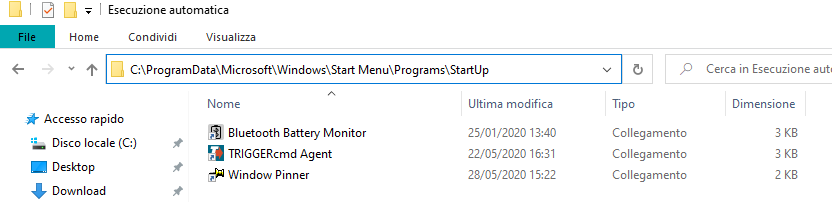
      That is precisely what is not working, my startup folder looks like this:
      Screen.png

      As you can see there are other programs that are starting fine at boot, but triggerCMD is never starting!

      I tried inserting the link in both startup folders (common and user), and as a registry key to launch at startup too, and none of this is working...

      RussR 1 Reply Last reply Reply Quote 0
      • RussR Offline
        Russ @Guest
        last edited by

        @TheConfax, man that is odd. I've never seen this before. It works fine if you run it manually right?

        I don't get it. You could try uninstalling and re-installing it. That won't delete your data.

        I don't have a lot of confidence it will fix it, but it's worth a try.

        Russell VanderMey

        ? 1 Reply Last reply Reply Quote 0
        • ? Offline
          [[global:former-user]] @Russ
          last edited by

          @Russ yeah I know that's odd, that is why I posted here on the forums, I was hoping that it was a known issue... šŸ˜ž

          I'll try reinstalling then! Thank you anyway!

          H 1 Reply Last reply Reply Quote 0
          • H Offline
            hdegenaro @Guest
            last edited by

            Hello. I'm also having the same problem. I've done the same tests and it didn't work. In my case, I'm in Brazil and I use Windows 10 Professional x64. It is worth mentioning that when I create the shortcut and place it in the start folder, the shortcut only works if I click on it. Does not work at startup. I like the program is very useful, I even paid for the license to enjoy another PC. I will be very happy if you find out why this is happening. Thanks.

            ? 1 Reply Last reply Reply Quote 1
            • ? Offline
              [[global:former-user]] @hdegenaro
              last edited by

              @hdegenaro Yes, the problem never solved for me too, you can put a simple .bat script in the startup folder pointing to the folder where TriggerCMD is installed to workaround, with the bat script launches every time.

              If you don't want to see a CMD window at every boot, you can convert it into an exe and make it a background software.

              Hope this helps you, this problem must be solved though.

              H 1 Reply Last reply Reply Quote 0
              • H Offline
                hdegenaro @Guest
                last edited by

                @TheConfax Thanks for answering. I will do this and I will return to speak if it worked.

                H 1 Reply Last reply Reply Quote 0
                • H Offline
                  hdegenaro @hdegenaro
                  last edited by

                  @TheConfax Hello, my friend ... I would like to say that it worked for me too. Thanks for the tip!

                  1 Reply Last reply Reply Quote 0
                  • H Offline
                    hdegenaro
                    last edited by

                    @Russ There is a way to fix this problem in your program so that it starts with Windows? The installation of the "background service" does not work either. Isn't this a bug? Sorry for the questions.

                    Ivan KulerI RussR 2 Replies Last reply Reply Quote 0
                    • Ivan KulerI Offline
                      Ivan Kuler @hdegenaro
                      last edited by

                      @Russ ... Same issue here. Seems to have a incompatibility with a app from MS at the Store (Phone).

                      1 Reply Last reply Reply Quote 0
                      • RussR Offline
                        Russ @hdegenaro
                        last edited by Russ

                        @Ivan-Kuler and @hdegenaro, I think it is a bug, but it's difficult for me to fix because the bug doesn't happen for me. For me, on all of my computers, it always starts up automatically when I log in. If I could see the bug myself, I could probably fix it.

                        Russell VanderMey

                        Ivan KulerI 1 Reply Last reply Reply Quote 0
                        • Ivan KulerI Offline
                          Ivan Kuler @Russ
                          last edited by

                          @Russ for me no worries at all... but happen in 2 of my computer already.
                          The workaround to use a batch (in my case a Ahk script compiled in Exe file works..

                          Meanwhile, I’m seeking to figure out is is a incompatible with a process running... the App Your Phone from MS Store.

                          Keep you aware..

                          Br,

                          RussR 1 Reply Last reply Reply Quote 0
                          • RussR Offline
                            Russ @Ivan Kuler
                            last edited by

                            Thanks @Ivan-Kuler.

                            Russell VanderMey

                            1 Reply Last reply Reply Quote 0
                            • ? Offline
                              [[global:former-user]]
                              last edited by

                              @Russ I just wanted to check in again to say that I'm noticing that the .bat workaround is not working for me every time lately... have you tried to dig into this? I can provide you troubleshooting info if you need it.

                              RussR 1 Reply Last reply Reply Quote 0
                              • RussR Offline
                                Russ @Guest
                                last edited by Russ

                                @TheConfax, honestly I forgot about it, but I'd like to solve it if I can.

                                I wonder if the problem is specific to certain non-english versions of Windows 10. Are you running an Italian version of Windows 10?

                                I'm confident I can solve it if I can reproduce the problem. I'd like to create a virtual machine running Windows 10 with the Italian version (if that's what you're running). I tried installing an additional language on my Windows, but that didn't show me the problem.

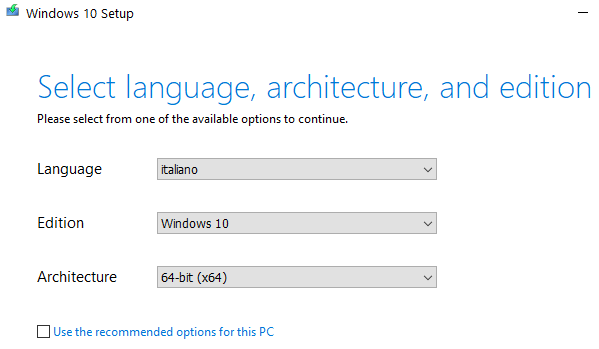
                                Right now I'm downloading an Italian version of Windows 10 ISO using the media creation tool I downloaded from here:
                                https://www.microsoft.com/it-it/software-download/windows10
                                e79b76e5-5fc0-411f-b3a2-bb37bc6f99fe-image.png

                                Russell VanderMey

                                1 Reply Last reply Reply Quote 0
                                • ? Offline
                                  [[global:former-user]]
                                  last edited by

                                  @Russ Yes, I'm running Win10 Home in Italian, probably the Brazilian guy had one in Portuguese... could be that, let us know šŸ˜‰

                                  RussR 1 Reply Last reply Reply Quote 0
                                  • RussR Offline
                                    Russ @Guest
                                    last edited by

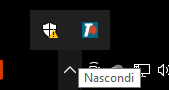
                                    @TheConfax, bad news. It worked fine for me. I installed the TRIGGERcmd agent and rebooted my Italian version of Windows 10 and it automatically started up.
                                    998ea471-d99b-424b-8f3c-80cd42f556f7-image.png

                                    Russell VanderMey

                                    ? 1 Reply Last reply Reply Quote 0
                                    • ? Offline
                                      [[global:former-user]] @Russ
                                      last edited by

                                      @Russ To be honest is not a constant thing, without the fix it starts like 1 out of 10 attempts, with the .bat fix it starts like 19 out of 20 attempts.

                                      Try rebooting some times, if unsuccesful in breaking it, try shutting down and powering on the virtual machine some times, both with and without fast startup enabled.

                                      RussR 1 Reply Last reply Reply Quote 0
                                      • RussR Offline
                                        Russ @Guest
                                        last edited by

                                        @TheConfax, I tried rebooting the VM many times and I have not seen the problem.

                                        I did an experiment though - I disconnected the VM from the Internet, then quit and re-launched the TRIGGERcmd agent, and I found that it automatically quit because it couldn't connect to the server.

                                        I wonder if that's what's happening to you. Is it possible your TRIGGERcmd agent is launching before your computer is connected to the Internet during boot?

                                        Russell VanderMey

                                        ? 1 Reply Last reply Reply Quote 0
                                        • ? Offline
                                          [[global:former-user]] @Russ
                                          last edited by

                                          @Russ Yes, it is very much possible, because my Wi-Fi card connects only after user login.
                                          In my .bat fix i included a 30 second delay, that could explain why even that sometimes is not working.
                                          You could try implementing a little loop at boot checking for network more than one time and it should be fixed ^^

                                          RussR 1 Reply Last reply Reply Quote 0
                                          • RussR Offline
                                            Russ @Guest
                                            last edited by

                                            @TheConfax, ok, yea I think I can fix this.

                                            Russell VanderMey

                                            ? 1 Reply Last reply Reply Quote 0

                                            Hello! It looks like you're interested in this conversation, but you don't have an account yet.

                                            Getting fed up of having to scroll through the same posts each visit? When you register for an account, you'll always come back to exactly where you were before, and choose to be notified of new replies (either via email, or push notification). You'll also be able to save bookmarks and upvote posts to show your appreciation to other community members.

                                            With your input, this post could be even better šŸ’—

                                            Register Login
                                            • First post
                                              Last post