Trigger commands with a Tasker HTTP Post action
-
Tasker is an application for Android which performs tasks (sets of actions) based on contexts (application, time, date, location, event, gesture) in user-defined profiles or in clickable or timer home screen widgets.
Now you can create a tasker action that runs a command on your computer via TRIGGERcmd. Here's how:
In Tasker, under the Tasks tab, tap the + button to add a Task, then give it a name like "Playlist on Family"
Tap the + button in the Task Edit screen to add an Action to your task.
Select "Net", then "HTTP Post", then configure them as these screenshots show.Server:Port: https://www.triggercmd.com
Path: api/Tasker?trigger=Calculator&computer=Downstairs
Data/File: token=(your token from the Instructions page)
Content Type: application/x-www-form-urlencodedMake sure you don't have a carriage return between "token=" and your token from the Instructions page. I made that mistake and it took a while to figure out what I'd done wrong.
I emailed my token to myself so I could copy/paste it on my Android.
Tasker lets you export an action as an Android app, so now I can tap an icon on my Android desktop that opens my garage. That's pretty sweet.


EDIT 9/4/17: Now you can add ¶ms=(your command parameters) to your Path or your Data/File field to pass Tasker variables as command parameters. You have to enable parameters on your commands first.


-
Here's a reference to the old UI using an HTTP Post
Server:Port: https://www.triggercmd.com
Path: api/Tasker?trigger=Louder&computer=Desktop
Data/File: token=123xyz
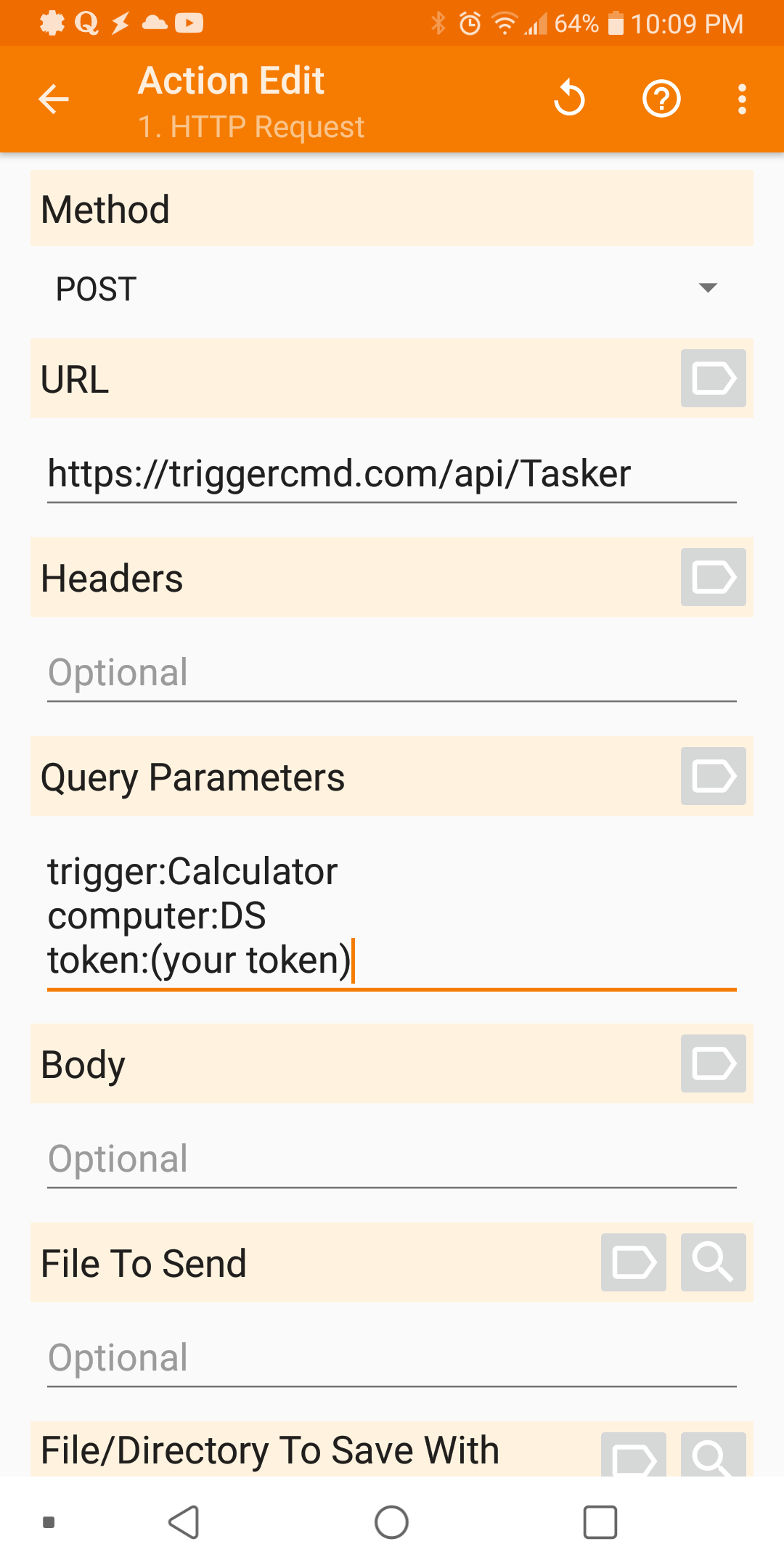
Content Type: application/x-www-form-urlencodedThe new API has these fields. Can you map the above parms to the below parms.
Method: Post
URL:
Headers:
Query Parameters:
Body:
File to Send: -
@Grant-Fitz, this should work with the new HTTP Request task type:
-
 R Russ referenced this topic on
-
R Russ referenced this topic on
-
R Russ referenced this topic on

Hello! It looks like you're interested in this conversation, but you don't have an account yet.
Getting fed up of having to scroll through the same posts each visit? When you register for an account, you'll always come back to exactly where you were before, and choose to be notified of new replies (either via email, or push notification). You'll also be able to save bookmarks and upvote posts to show your appreciation to other community members.
With your input, this post could be even better 💗
Register Login