Make sure to adjust the folder paths. I doubt you'll put your script in d:\appdev\triggercmd\youtube-dl or put your downloaded files in m:\videos\youtube like I did.
Create a folder, open a cmd window in that folder, and type these to create the virtual environment with the yt_dlp python module:
python3 -m venv myenv
myenv\Scripts\activate.bat
pip3 install yt_dlp
youtube-dl.bat contents:
setlocal enabledelayedexpansion

:: This version of the script differs from the one in the Youtube video in that it handles any of these Youtube URL formats:
:: https://www.youtube.com/watch?v=KqfRiPy5gFs
:: https://youtu.be/KqfRiPy5gFs
:: KqfRiPy5gFs

:: Combine all arguments into a single string
set "input="
for %%A in (%*) do (
    set "input=!input! %%A"
)

:: Remove leading spaces
set "input=%input:~1%"

:: Check if the input contains "youtu.be" format and extract the video ID
echo %input% | findstr /C:"youtu.be" >nul
if not errorlevel 1 (
    set "id=%input:~17%"  :: Strip "https://youtu.be/"
)

:: Check if the input contains "youtube.com/watch?v=" format and extract the video ID
if not defined id (
    echo %input% | findstr /C:"youtube.com/watch?v=" >nul
    if not errorlevel 1 (
        set "id=%input:~32%"  :: Strip "https://www.youtube.com/watch?v="
    )
)

:: If input is just the ID, no need for stripping
if not defined id (
    set "id=%input%"
)

:: Ensure the ID is exactly 11 characters long
set "id=%id:~0,11%"

echo YouTube Video ID: %id%

:: Go to the folder where I want the files to be created
cd /d m:\videos\youtube

:: Activate the Python virtual environment that has the yt_dlp module installed
call d:\appdev\triggercmd\youtube-dl\myenv\Scripts\activate.bat

:: Run the python script to download the video and metadata
python d:\appdev\triggercmd\youtube-dl\youtube-dl.py %id%  > debug.log 2>&1
youtube-dl.py contents:
import yt_dlp
import json, uuid, sys

def download_video_metadata(video_url):
    ydl_opts = {
        'quiet': True,
        'skip_download': True,
        'force_generic_extractor': False,
    }

    with yt_dlp.YoutubeDL(ydl_opts) as ydl:
        try:
            info_dict = ydl.extract_info(video_url, download=False)
            return info_dict
        except Exception as e:
            print(f"Error: {e}")
            return None

def download_video(video_url):
    ydl_opts = {
        'quiet': False,
        'outtmpl': '%(title)s.%(ext)s',
    }

    with yt_dlp.YoutubeDL(ydl_opts) as ydl:
        try:
            ydl.download([video_url])
        except Exception as e:
            print(f"Error: {e}")

if __name__ == "__main__":
    if len(sys.argv) != 2:
        print("Usage: python3 youtube-dl.py <YouTube Video URL>")
        sys.exit(1)

    video_url = sys.argv[1]
    metadata = download_video_metadata(video_url)

    if metadata:
        print("Metadata:")

        filename=metadata.get('title', uuid.uuid4()) + ".json"
        with open(filename, "w") as file:
            json.dump(metadata, file, indent=4)

        print("Downloading video...")
        download_video(video_url)
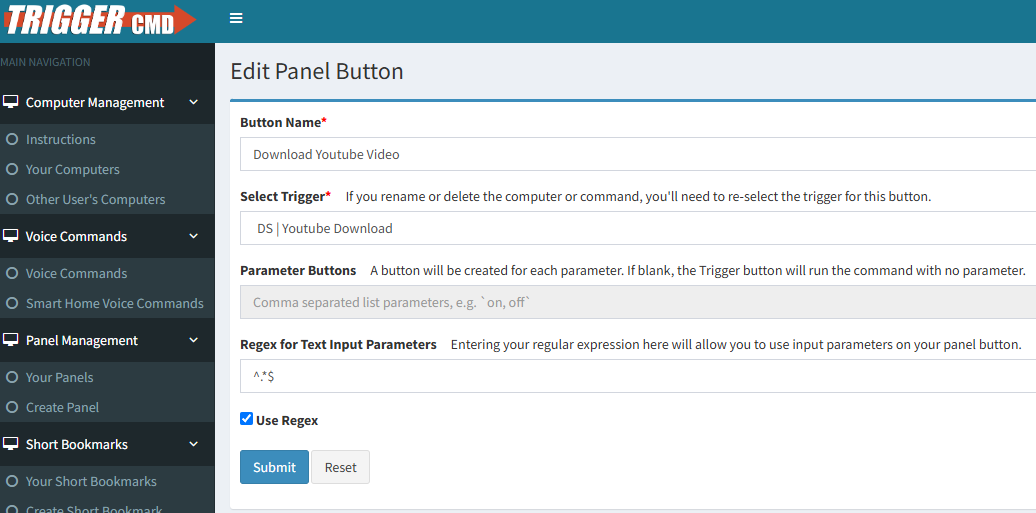
Make sure you enable parameters:

If you want to create a panel, you can use this regex to accept any text: ^.*$